Industry focus
Project management software
for mechanical and plant engineering
Quick answer
Project management software for mechanical and plant engineering has to handle complex engineering projects with long timelines, resources shared across design, manufacturing, and assembly, and structured supplier integration. Linetrack, from Stuttgart, brings collaborative project planning and native capacity management together in one system. Linetrack replaces separate Excel lists and planning tools – in use at Schnaithmann, Stoll Gruppe, bavius, and LANG Technik.





4000+
completed
industrial projects
400+
replaced Excel lists
and planning tools
1512
projects managed
in parallel
10
working days from
kick-off to go-live
Figures from live Linetrack implementations, as of August 2026.
Challenges
Why standard software fails in mechanical and plant engineering
Engineering projects in mechanical and plant engineering run for months to years, share designers and fitters, and depend on supplied parts. Generic PM tools weren't built for that – here are four reasons they fall short. What software needs to do instead is covered in the requirements for multi-project management software.
Long timelines, many projects at different stages at once
A special-purpose machine project runs for 12 to 18 months. Meanwhile, ten more are running in parallel at different phases – from quotation design to commissioning. Tools built for short sprints can't capture that overlap.


Design, manufacturing, and assembly compete for the same people
The same designers and fitters are needed across multiple projects. Without a cross-project view of capacity, overloads and idle time emerge – and usually aren't noticed until the delivery date is at risk.
Supplied parts determine the critical path
A late casting or control module delay pushes back the entire assembly. When suppliers are coordinated by email, that dependency is missing from the project plan – until it's too late.
Excel and MS Project don't give you the full picture
Every project manager maintains their own file, and management gets status updates secondhand. A reliable portfolio view across all mechanical engineering projects simply doesn't exist. Linetrack customers had several separate planning lists at once – four out of five of them plain Excel files. See how Linetrack stacks up against classic tool landscapes and point solutions in the multi-project management software comparison.
Requirements
What project management software needs to deliver for mechanical engineering
Project management software for mechanical and plant engineering has to do more than manage tasks. It needs to reflect the reality of long-running engineering projects with shared resources and external suppliers. Six requirements are essential:
Linetrack meets all six requirements in one system – covered in detail below.
- Multi-project resource planning: Plan designers, fitters, and plant technicians across projects – who's free when, and who's overloaded.
- Native capacity management: Schedules and available capacity in one system, not in separate tools that need manual reconciliation.
- Supplier integration into the schedule: Supplied parts and external trades as visible activities in the project plan, not buried in separate email threads.
- Planned-vs-actual comparison over long timelines: Spot deviations over months before they threaten the delivery date.
- Interfaces to ERP and time tracking: Connections to the systems standard in mechanical engineering – SAP, AIDA, Finkzeit, OptiTime and others.
- Portfolio transparency for management: A complete view of all parallel projects, workload, and critical dates at a glance.
Solution
Why Linetrack is the right project management software for mechanical engineering
Generic project management tools are built for simple task lists, not interconnected project landscapes. They fall short on industrial projects with heavy dependencies, interwoven resources, and external partners. Linetrack is built differently.
Collaborative, not a PMO island
Project management, departments, and suppliers plan in the same system – not in separate tools synced later. Data is created where it belongs and is instantly available everywhere.
Scheduling and capacity in one system
Unique in the market: scheduling and resource planning are natively connected. No data loss between tools, no conflicting versions, no manual syncing between MS Project and Excel.
Built with mechanical engineering depth
Built for the complete workflow: quotation, design, manufacturing, assembly, commissioning, acceptance. With long timelines and heavy dependencies. Not for software sprints or marketing campaigns.
USP 1
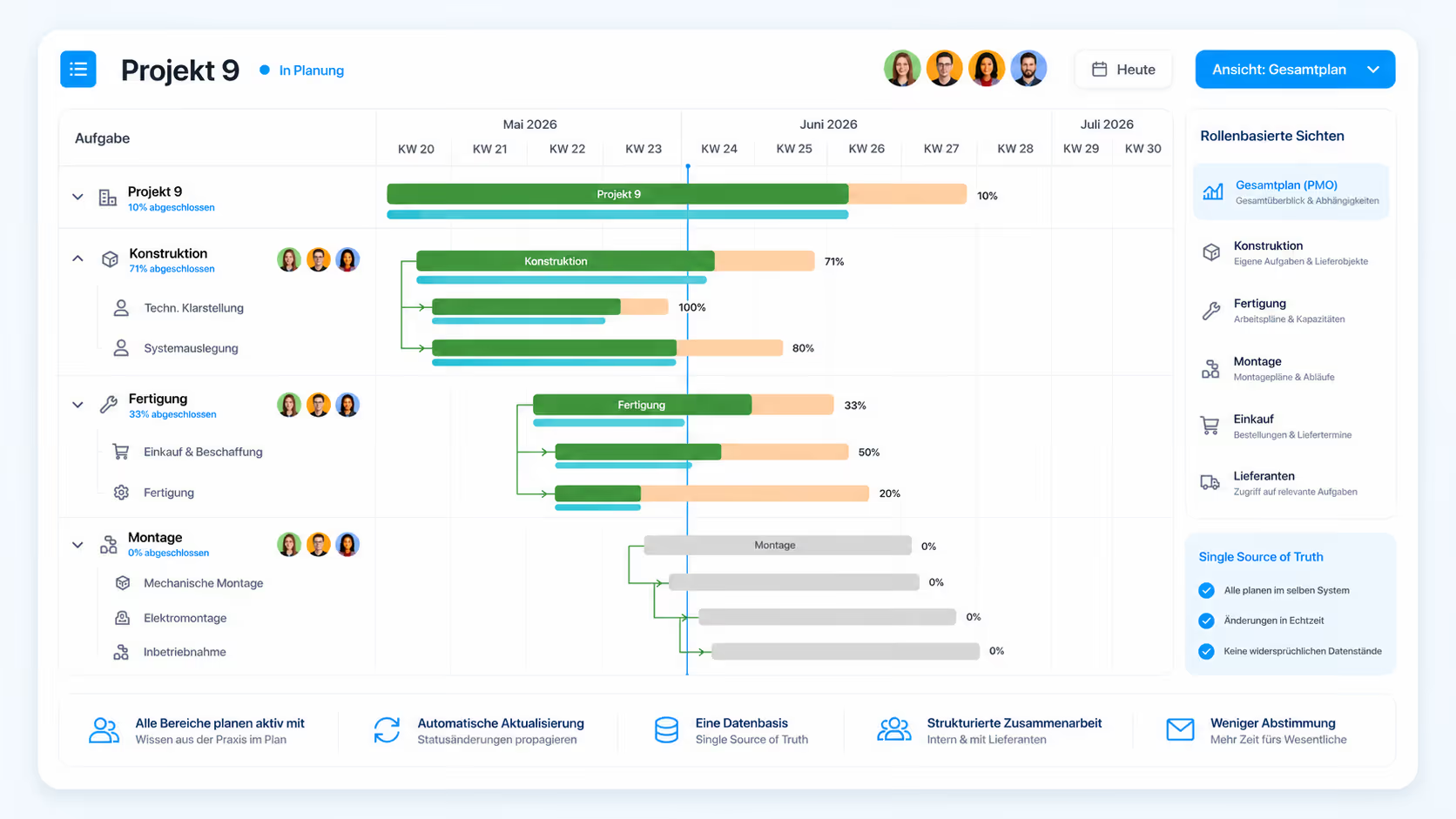
Plan collaboratively – design, manufacturing, and assembly in one system
In mechanical and plant engineering, design knows best how long a component will take. Manufacturing knows its machine schedule. Assembly knows its capacity. Purchasing knows lead times. Standard tools force all that information through a central project manager who has to collect it via status calls – slow and error-prone.
Linetrack lets every department maintain its own planning, in the same system. Project management sees the real status across every trade in real time – no more weekly status emails. The result is a project plan that reflects reality instead of wishful thinking.
Role-based views: design, assembly, purchasing, and the PMO each see what's relevant to them
Suppliers get structured access to their tasks and deadlines
Status changes propagate automatically across the whole portfolio
A single source of truth – no conflicting data states
USP 2
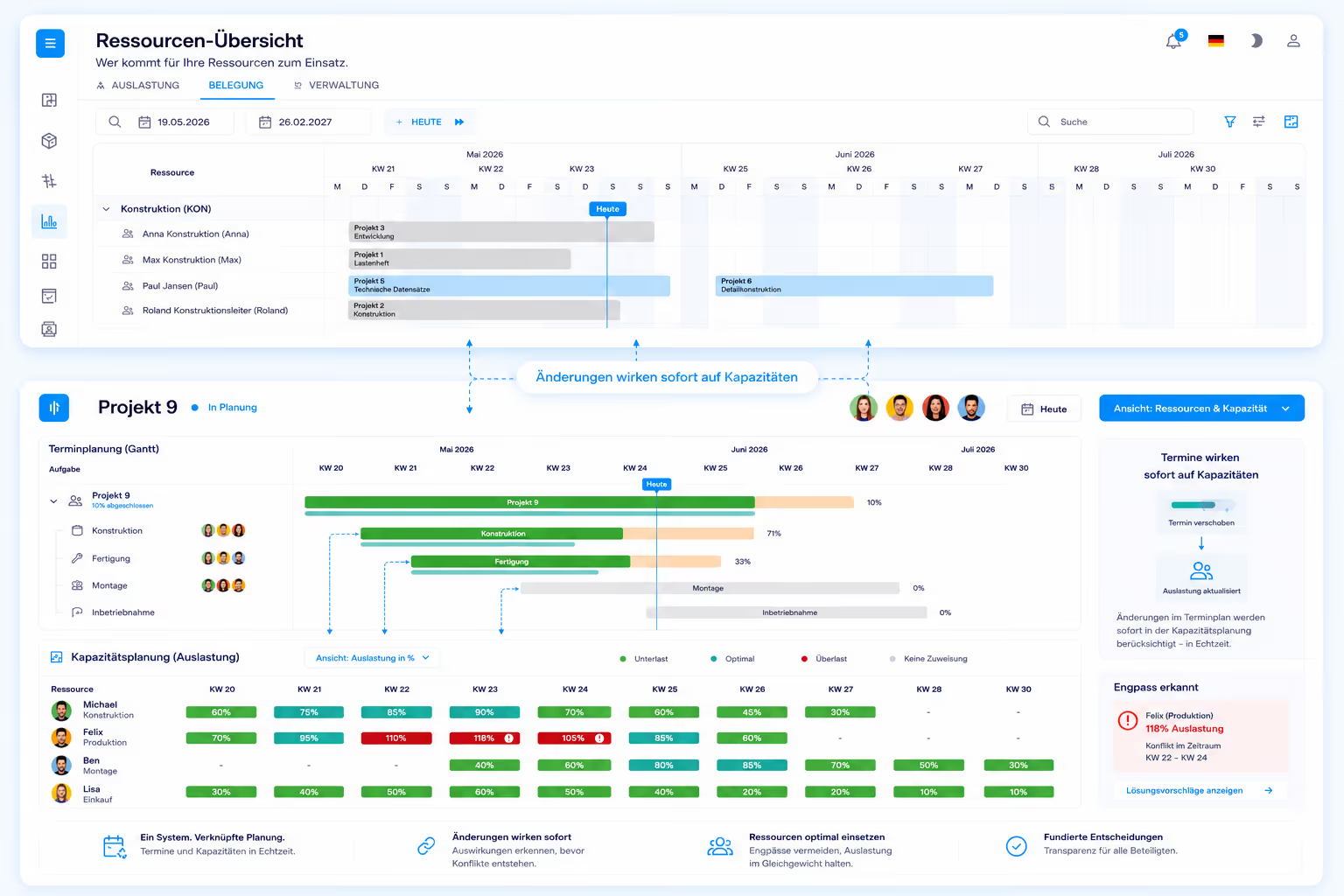
Scheduling and capacity together in one system
At most mechanical engineering companies, scheduling lives in MS Project while capacity planning lives in Excel or the ERP system. The two are reconciled manually – with lag and constant conflicts. When a delivery date shifts, capacity planning doesn't find out until days later.
Linetrack connects both natively. When a date shifts, capacity planning sees it instantly. If a designer is out, the effect on dependent activities shows up immediately. This isn't an interface between two systems – it's one system. No other provider in mechanical engineering offers this combination natively.
USP 3
Built for the engineering workflow in mechanical engineering
From quotation through design, manufacturing, and assembly to commissioning and acceptance: Linetrack covers the complete project lifecycle of a mechanical or plant engineering project. Structure plans for complex machines, planned-vs-actual comparisons over long timelines, milestones through to final acceptance.
Generic tools don't understand this logic. They're built for marketing sprints or software tickets, not for a special-purpose machine that takes 14 months from the first sketch to acceptance. Linetrack is.
Comparison
Specialized, not generic – Linetrack compared for mechanical engineering
Generic project management tools and classic point solutions like MS Project or Excel cover isolated parts of the problem. They lack the depth needed for the reality of a mechanical or plant engineering project – long timelines, shared resources, suppliers on the plan. How that reality differs from other industries is described on the project control in mechanical and plant engineering page.
FAQ
Frequently asked questions
Still have questions?
Book a slot with our team.
Which project management software is right for mechanical engineering?
Which project management software is right for mechanical engineering?
What does project management software cost for mechanical engineering companies?
What does project management software cost for mechanical engineering companies?
How does PM software for mechanical engineering differ from standard tools?
How does PM software for mechanical engineering differ from standard tools?
Can project management software replace MS Project in mechanical engineering?
Can project management software replace MS Project in mechanical engineering?
What interfaces does PM software need in mechanical engineering?
What interfaces does PM software need in mechanical engineering?
How do you integrate suppliers into mechanical engineering projects?
How do you integrate suppliers into mechanical engineering projects?
What company size is Linetrack suited for in mechanical engineering?
What company size is Linetrack suited for in mechanical engineering?
How long does it take to roll out Linetrack in mechanical engineering?
How long does it take to roll out Linetrack in mechanical engineering?
Case study
How a mechanical engineering company replaced its old system
MSG Solutions used to plan its mechanical engineering projects across separate tools and lists. With Linetrack, all projects now come together on one central platform – with a reliable overview of schedules, resources, and status. The old system was fully retired. How that played out in detail is set out in the MSG Solutions case study.
A second case study from the same industry: Schnaithmann Maschinenbau replaced a project management system that did not give the transparency needed in many areas, and now plans across departments.
A third: LANG Technik keeps track of complex development and automation projects, planned collaboratively across departments.
A fourth: Krüger & Salecker builds forming machines for the food, pharma, and petfood industries and has tracked its project data in one place since.
“Thanks to Linetrack, we successfully replaced our old system!"


Learn more
Linetrack in detail
The features behind connected scheduling and capacity planning: