Software Comparison
Multi-Project Management Software
Compared Honestly

Quick Answer
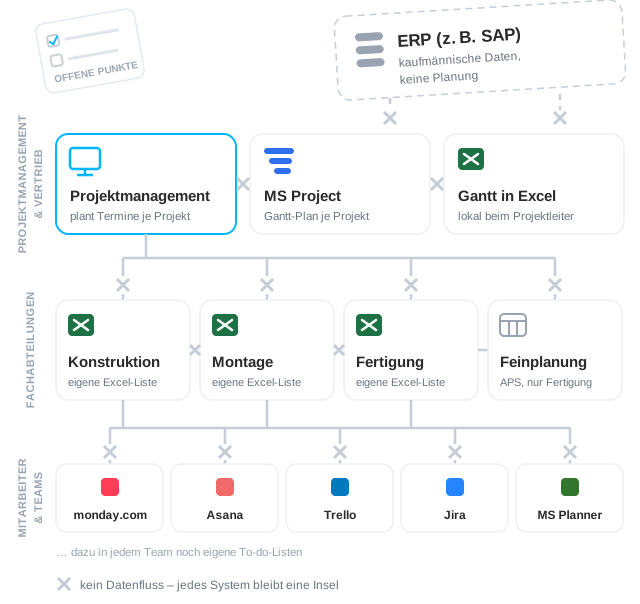
Multi-project management software falls into five categories. Each covers one slice of project control – and remains an isolated silo without a connection to the rest of the system landscape:
Linetrack connects project and department planning with ERP and time-tracking systems in one collaborative platform – in use at Stadler Rail, Schnaithmann, LANG Technik, and MSG Solutions.
What multi-project management means as a planning approach, before this page gets into the individual software categories, is explained on the multi-project management overview page.


91 %
named Excel and tool
chaos as their starting problem
400 +
replaced Excel lists
and planning tools
1512 +
projects managed
in parallel
4000 +
completed
industrial projects
Figures from productive Linetrack implementations, as of August 2026.
The Market in 5 Categories
What Multi-Project Management Software Actually Exists?
Comparing project management software usually means comparing vendors. It makes more sense to first understand the categories – they determine which problem a system can even solve. Five categories cover the market. And in almost every industrial company, several are in use at once, before Linetrack replaces them.
For the five core requirements software actually has to meet day to day, see our multi-project management software requirements checklist.
Agile PM Tools
Boards, sprints, tasks: agile tools are built for teams working iteratively without a fixed target date – software development, marketing, agencies. They excel at task management for a single team. Plan-driven industrial projects work differently, though: there's a committed delivery date, a critical path, and departments sharing the same resources. Agile tools don't cover scheduling and capacity planning across parallel projects – that's simply not what they were built for.


Classic Project Planning Software
Gantt charts, milestones, dependencies: classic planning tools like MS Project excel at scheduling individual projects. That's exactly where the limit lies: the plan lives on the project manager's computer. No connection to department planning, no cross-project capacity view, no link to ERP or time tracking. Every plan is its own silo – and none of them show what the specialist departments can actually deliver.
Excel and Homegrown Solutions
The most widespread category – especially in staff scheduling. Excel is flexible, everyone knows it, and over the years every department ends up with its own solution, sometimes even backed by its own database. The price: no shared data foundation, no connection between the lists, everything only as current as the last manual update. Of the more than 400 planning tools Linetrack has replaced for its customers, most were Excel solutions.
ERP Project Modules
Almost every ERP system comes with a project module. Its home turf is the work breakdown structure: calculating hours, posting costs, controlling budgets. That's what it's built for – and it's good at it. What it isn't good at is scheduling: too complicated, too little overview, too much upkeep. In practice, the same thing happens almost every time: schedules move back into Excel or other systems, and the ERP module ends up merely documenting what's already been decided.
Linetrack vs. ERP project moduleAPS and Finite Scheduling Systems
Finite scheduling and shop-floor control systems schedule production: fed from the ERP, they plan staffing and department resources in detail. An established tool for series production. For complex, long-running projects, they turn into an administrative monster: they need perfectly maintained master data, are hard to operate – and few of them are suited to scheduling and overseeing large projects with cross-department dependencies.
Linetrack vs. detailed scheduling systemHave a specific tool or system in mind? The head-to-head comparisons put Linetrack against MS Project, Excel, Asana and other tools, as well as the ERP project module and the detailed scheduling system.
The Real Misconception
The Problem Usually Isn't the Tool –
It's the Missing Connection
Each of the five categories solves one slice: the ERP handles controlling, agile tools handle tasks, Gantt planners handle scheduling, Excel fills the gaps in between, finite scheduling handles department resources. And every new PM tool rollout repeats the same mistake: it replaces the project planning – and adds one more silo next to the existing ones. Project planning doesn't know department workload. Finite scheduling doesn't know project dates. And between all the systems, reconciliation happens manually: by email, by meeting, by yet another Excel list.
What matters isn't which planning tool a company introduces – it's whether it connects project planning, department planning, ERP, and time tracking on one shared data foundation.
How this connected planning looks specifically in machinery and plant engineering is covered on our project management software page for machinery and plant engineering.
The Difference
One System That Connects the Silos
Strictly speaking, Linetrack is a plan-driven project planning tool – built for scheduling and capacity planning in complex industrial projects. The difference from all five categories: Linetrack doesn't just replace project planning, it connects it with everything around it.
How this difference plays out specifically in machinery and plant engineering is covered on our industry page for machinery and plant engineering.
Project Planning + Department Planning
Project leads and specialist departments plan in the same system. Every committed date is checked against the real workload of design, production, and assembly – across all parallel projects.
Connected to Your ERP
Linetrack doesn't replace the ERP – it adds the forward-looking planning view. Interfaces to SAP, proALPHA, AP+, and other systems keep master data and orders in sync, without duplicate upkeep.
Connected to Time Tracking
Actual hours and absences flow automatically into capacity planning – via connections to AIDA, Finkzeit, OptiTime, or VenDoc. Planning works with what's genuinely available.
Collaborative, Not Single-User
The plan doesn't live on the project manager's computer, but in a shared system – including task tracking via the Linetrack app and structured supplier involvement. Status check-ins by email become unnecessary.
When Not to Choose Linetrack
When Another Category
Is the Better Choice
No system is right for everything – Linetrack included. Two cases where another category fits better:
Agile Team Without Fixed Deadlines
Iterative work without committed delivery dates and without capacity shared across projects: an agile PM tool is lighter for that. Once dates are committed and several departments need the same people, it lacks the scheduling and capacity logic.
Pure Series Production
If you exclusively manufacture series products with no project character, you don't need project planning – you need strong finite production scheduling straight from the ERP. Linetrack only becomes relevant once development projects enter the picture.
For everything in between – plan-driven projects with shared resources, multiple departments, and external parties – connected planning is what makes the real difference.
For a methodical primer on different project-control approaches, see our guide on project-control methods compared.
References
From Excel and Software Silos to a Shared Data Foundation


MSG Solutions uses Linetrack in project management and across departments to plan and manage projects efficiently. The system has fully replaced our old PM tool and now serves as the central platform for scheduling and resource planning.
Thanks to a shared data foundation, we always have a clear overview of the status of all projects and save significant time on portfolio analysis. The workflows are ideally suited to the requirements of mechanical and plant engineering - planning and decisions can be made in a practical, well-founded way.
We particularly value the support: the Linetrack team responds quickly, is flexible in further development, and trains the application in a hands-on way tailored to our processes. You can tell that real experience from mechanical engineering goes into it.

„Before Linetrack, we used a project management system that didn't give us the transparency we needed in many areas. On top of that, different departments worked with their own isolated planning lists.
With Linetrack, we were able to replace these processes and now have professional, cross-departmental scheduling and resource planning - from the sales phase through to project tracking. We especially value the collaborative way of working and the close support from the Linetrack team, who adapted the software to our requirements, migrated our legacy data, and trained our staff.
For us, Linetrack isn't just another tool - it's a solution that actually works.“

„Linetrack has helped us keep track of complex development and automation projects. Project plans are now created collaboratively across departments and tracked automatically.
What convinces us most is the ease of use, combined with close contact with the Linetrack team. The flexible rollout and hands-on training meant our team adopted the solution quickly - a clear added value for our work.“

„As a company in mechanical engineering, we always struggled to track and manage project data efficiently. With Linetrack, we've not only brought transparency to our projects but also significantly increased our productivity.
We were especially impressed by the usability and the way data is presented, which lets us keep everything in view at all times.
I can recommend Linetrack to other companies without reservation. It's easy to use, highly efficient, and has genuinely simplified our business.

„At InVENTer GmbH, we develop ventilation systems for residential buildings and manage many cross-departmental projects.
Before Linetrack, the biggest challenge was that constant reminders and follow-ups were needed to keep track of tasks. With Linetrack, we were able to significantly reduce this effort: reminders now run automatically, and the team works noticeably more productively.
Rolling out the system was easy, the support from Linetrack was excellent - and it's so intuitive to use that everyone got up to speed quickly. We especially appreciate that the training module is available at any time.“

FAQ
Frequently Asked Questions
Still Have Questions?
Book a meeting with our team.
What types of multi-project management software are there?
What types of multi-project management software are there?
Why isn't the project module in an ERP system enough for scheduling?
Why isn't the project module in an ERP system enough for scheduling?
What's the difference between finite scheduling systems and multi-project management software?
What's the difference between finite scheduling systems and multi-project management software?
Are agile tools like Kanban boards suitable for mechanical engineering?
Are agile tools like Kanban boards suitable for mechanical engineering?
How many planning tools does a typical industrial company run in parallel?
How many planning tools does a typical industrial company run in parallel?
What should you look for when comparing multi-project management software?
What should you look for when comparing multi-project management software?
This comparison covers the system categories – for the criteria that matter in detail, see our guide on what to look for in multi-project management software.
Learn More
Linetrack in Detail
The features behind connected scheduling and capacity planning: