Case study
MSG Solutions: central scheduling and resource planning with Linetrack
- Custom machine building
- Modernization & retrofit
- Automation
- Measurement technology

What does MSG Solutions use Linetrack for?
MSG Solutions, a custom machine builder based in Schmallenberg, North Rhine-Westphalia, plans schedules and resources across departments in Linetrack. A project management system was in use before, but the departments were never brought into it, and sales could only view the plans. Linetrack replaced that system, and the lists running alongside it with it.
The company
What MSG Solutions builds
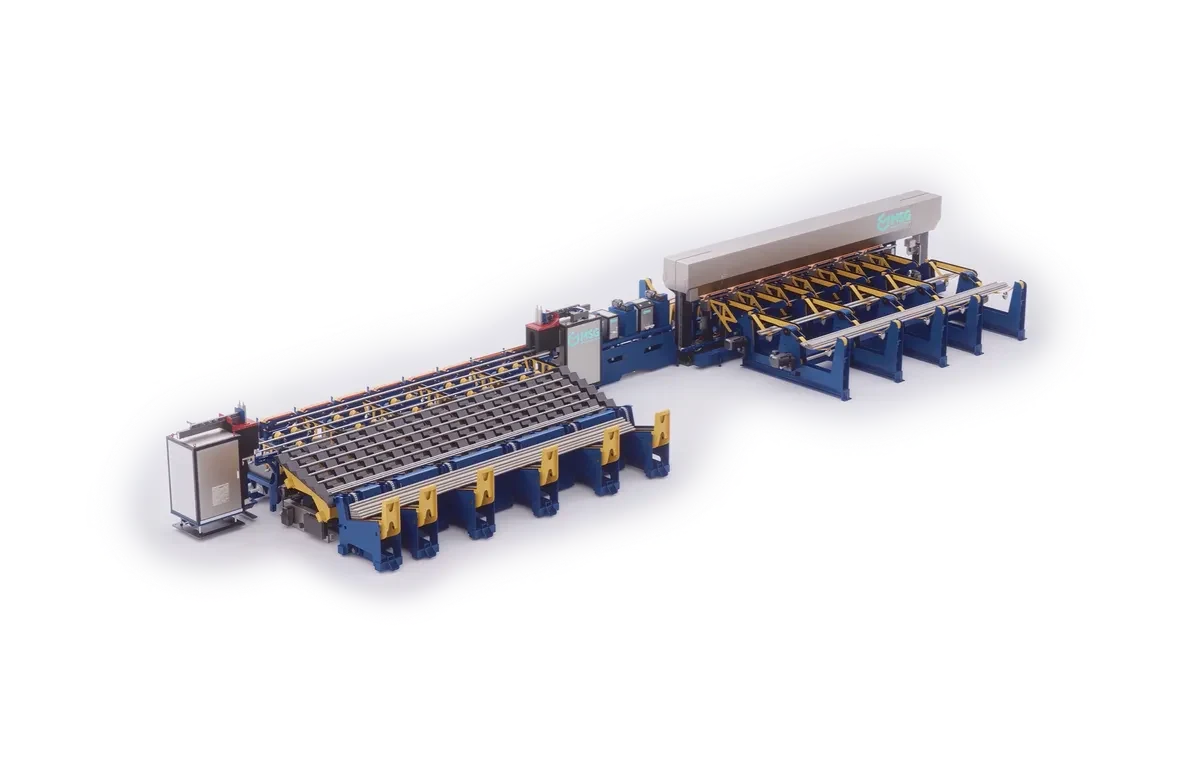
MSG Solutions, based in Schmallenberg in the Sauerland region, has built custom machines for rod and tube processing since 1998: sawing, milling, straightening, grinding, boring, turning, forming and deburring, from single-station machines through to linked, turnkey production lines. The portfolio is rounded out by proprietary inline measurement technology that checks cross-section, outer contour and internal geometry directly on the machine.
Three business areas carry the offering: processing solutions, modernization and retrofit of existing systems, and custom automated solutions with robotics. Customers come from steel and tube production, the automotive industry and construction supply, among others – industries where a single order ties up design, manufacturing and assembly for months at a time. That is exactly what Linetrack is built for in mechanical and plant engineering – and all the more so in special-purpose machinery with a high engineering share.
Customer voice
“Our old PM tool, fully replaced”
MSG Solutions uses Linetrack in project management and across departments to plan and manage projects efficiently. The system has fully replaced our old PM tool and now serves as the central platform for scheduling and resource planning.
Thanks to a shared data foundation, we always have a clear overview of the status of all projects and save significant time on portfolio analysis. The workflows are ideally suited to the requirements of mechanical and plant engineering - planning and decisions can be made in a practical, well-founded way.
We particularly value the support: the Linetrack team responds quickly, is flexible in further development, and trains the application in a hands-on way tailored to our processes. You can tell that real experience from mechanical engineering goes into it.


The starting point
How did MSG Solutions plan before Linetrack?
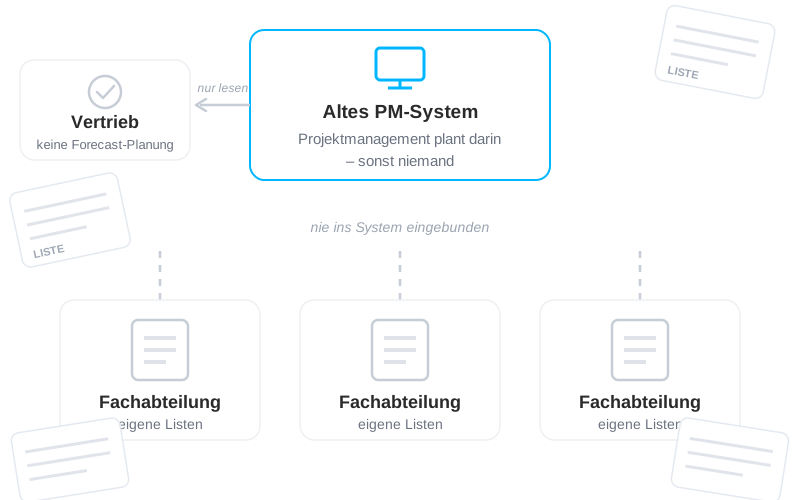
A project management system was already in use before Linetrack, and project planning ran in it. What never worked was getting the departments into that system. They stayed outside it, and so did their planning.
Sales had access to the project plans and could give customers information from them. But no more than that. There was no forecast planning, so projects that were not yet orders did not appear in the plan at all.
Then there was the price. Measured against how much of the system was actually used, it had become too expensive. What remained was a tool that mapped project planning for one part of the company while the rest carried on with its own lists.
The rollout
From the system switch to a cross-departmental rollout
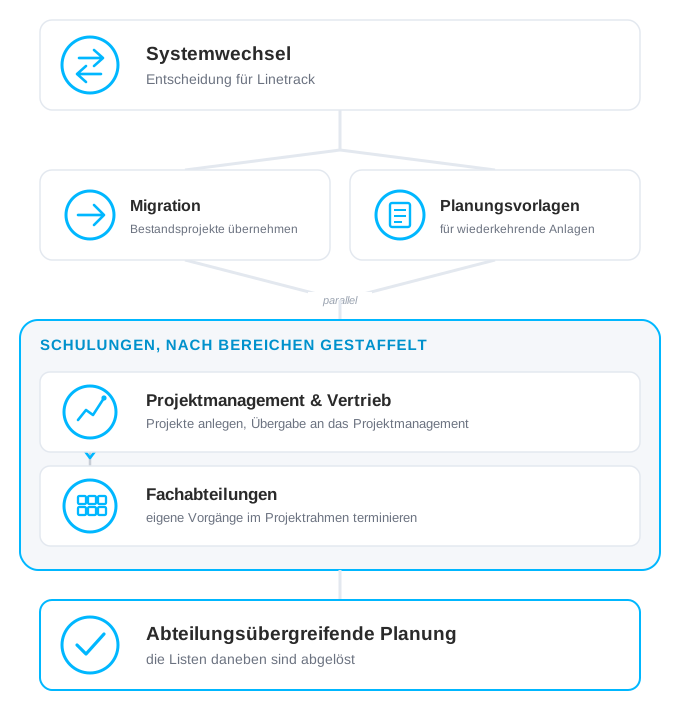
MSG Solutions switched to Linetrack and set up project planning across departments from the start. The existing projects came over from the previous system, and planning templates for recurring machinery were built alongside that.
Training ran staggered by area. Project management and sales first, then the departments.
That order has a reason. Projects have to be in the system in full before a department can schedule anything inside them – it plans within the frame that project management and sales set. The areas joined one after another from there, and the lists that had run alongside were replaced step by step. What this process looks like in general is set out under rolling out Linetrack.
The solution
What runs differently today
Four things have changed since the rollout.
One data foundation instead of many lists
What used to sit scattered across individual files is now in one place: dates, activities and responsibilities per project. When a date moves, the downstream areas see the new state without anyone updating a file. See collaborative high-level and detailed planning.


The departments plan for themselves
This is exactly where the old system failed. Today the departments schedule their own activities inside the project frame that project management sets. Planning happens where the knowledge sits, rather than in a copy someone else maintains. See resource and capacity planning.
Sales is part of the planning
Sales used to be able to view project plans and inform customers from them. Today the handover to project management runs on the same project rather than through a list, and what sales creates sits in the same system as the later order. See activities and tracking.
The state of every project, at any time
History and current state sit in the same view. For management that means the portfolio view is a look into the system, not the result of a round of enquiries. That is precisely what Matthias Kramer names as the time saved on portfolio analysis. See multi-project management.
The result
One system every area plans in
A system only one department worked in has become planning that everyone takes part in.
From the rollout
2–3weeks
for configuration and migration. The existing projects came over from the previous system, and the planning templates were built alongside.
2weeks
for all training, staggered by area: project management and sales first, then the departments.
What holds today
The old PM system is gone
In full, not in part – along with the cost it carried, measured against how much of it was actually used.
The lists alongside it are gone
Area by area. What the departments used to keep in their own files now sits in the same system as the project plan.
The state of every project is there to read
At any time, without a round of enquiries. That is where the time Matthias Kramer saves on portfolio analysis comes from.
Frequently asked questions
Questions about project management software for custom machine building
Still have questions?
Book a meeting with our team.
What project management software fits custom machine building?
What project management software fits custom machine building?
How long does it take to roll out multi-project management software?
How long does it take to roll out multi-project management software?
Can Linetrack connect to an existing ERP system?
Can Linetrack connect to an existing ERP system?
What sets Linetrack apart from Asana, Trello, or Monday?
What sets Linetrack apart from Asana, Trello, or Monday?
Why isn't Excel enough for project planning in custom machine building?
Why isn't Excel enough for project planning in custom machine building?
How does Linetrack plan retrofit projects alongside new machine builds?
How does Linetrack plan retrofit projects alongside new machine builds?
Learn more
Linetrack in detail
The features behind central scheduling and resource planning: