USP
Scheduling & Capacity Planning
in one system
- Schedules and capacity natively connected
- Absences imported automatically
- From forecast to workforce planning

In short
Scheduling and capacity planning in one system means: schedule planning and resource planning are natively connected, not living in separate tools that have to be reconciled by hand. When a date shifts, the impact on capacity is visible immediately. Linetrack, based in Stuttgart, connects both natively – and imports staff absences automatically from time tracking or HR systems, so capacity planning is based on real availability. Built specifically for industrial projects in machinery and plant engineering.




















4000+
completed
industrial projects
270+
parallel projects
at a single customer
1512
projects managed
in parallel
<10
working days from
kick-off to go-live
Figures from live Linetrack implementations, as of August 2026.
Challenges
Why separate scheduling and
capacity planning fails
In most industrial companies, scheduling and capacity planning live in separate systems. Manually reconciling them costs time and produces errors – four typical consequences.
Schedules and capacity drift apart
The schedule lives in MS Project, utilization in Excel or the ERP system. Both are reconciled manually – with an inevitable lag. What looks feasible on the schedule is, in reality, already overbooked.


Overload becomes visible too late
That a design engineer or a production team is overbooked only shows up once deadlines slip. Without a connected view, there is no early warning that would surface bottlenecks in time. Among Linetrack customers with a connected interface, every single one imports staff absences automatically from time tracking or HR – so capacity planning works with real available capacity instead of assumptions.
Every schedule change triggers manual work
When a delivery date shifts, capacity has to be adjusted by hand. With ten parallel projects, that becomes a full-time job – and by the time the reconciliation is done, it is already outdated again.
Nobody trusts the plan
When schedule and capacity data contradict each other, project managers and departments end up relying on word of mouth rather than the system. The plan loses its function as a reliable basis for decisions.
Definition
What is scheduling and capacity planning in one system?
Scheduling and capacity planning in one system means that project schedules and available resources are not planned separately, but within the same data foundation. Every schedule shift immediately affects capacity utilization – and vice versa. That keeps the timeline and resources consistent at all times, without a manual reconciliation between two tools.
In machinery and plant engineering this is decisive: the same design engineers, fitters, and plant technicians work across several projects at once. Only when schedules and capacity are connected can you tell whether a promised delivery date is realistic – or whether it rests on an overbooked resource.
The decisive point
Why scheduling without capacity planning doesn't work
A schedule always suggests the goal is achievable. Every task has a start and end date, and everything lines up neatly. The problem: pure schedule planning doesn't know its own resources. It shows when something is supposed to happen – but not whether the capacity for it is actually available.
Only capacity planning checks a schedule for plausibility. It factors in the real utilization of departments, individual people, and company-wide resources. A project deadline that assumes an overbooked design department isn't a plan – it's a hope.
In theory, you could achieve the same effect by overlaying every schedule in the company – only then do resource conflicts become visible. In practice, that is barely workable: nobody can meaningfully overlay ten or thirty Gantt charts. This visualization problem can only be solved if scheduling and capacity planning come together in one system from the start.
That is exactly what Linetrack delivers: scheduling and capacity planning run on a shared data foundation. The plausibility check happens automatically – for every single project, in the context of all the others. An optimistic schedule becomes a robust, resource-checked project plan.

In comparison
Pure schedule planners versus
connected scheduling and capacity planning
MS Project, Gantt tools, and comparable schedule planners are good at putting tasks into a chronological order. What they fundamentally can't do: they don't know the available resources. You can plan a date without the tool ever knowing whether the department needed is actually free during that period. Linetrack plans schedules and capacity on the same data foundation – every task is linked to the resources that carry it out.
Putting more schedules side by side doesn't fix this – quite the opposite. Only once schedules and capacity come together in one system does an optimistic timeline become a robust, resource-checked plan.
From coarse to fine
A planning chain from sales
all the way to workforce planning
In most companies, scheduling and capacity planning fails because every planning stage lives in its own system – sales in Excel, project management in MS Project, the department in its own list. At Linetrack, one continuous chain runs through it all: the hours data is captured once in sales and refined from stage to stage, instead of being re-entered everywhere.
That keeps project planning within a single data foundation from the first sales estimate all the way to workforce scheduling – no system break, no duplicate entry, no conflicting figures.
Every role sees what it needs
From plan to project execution people actually trust
A plan is only as good as how current it is. That's why Linetrack doesn't stop at the plan – it closes the loop: planned work is reported back, free capacity becomes visible, and deviations can be acted on immediately.
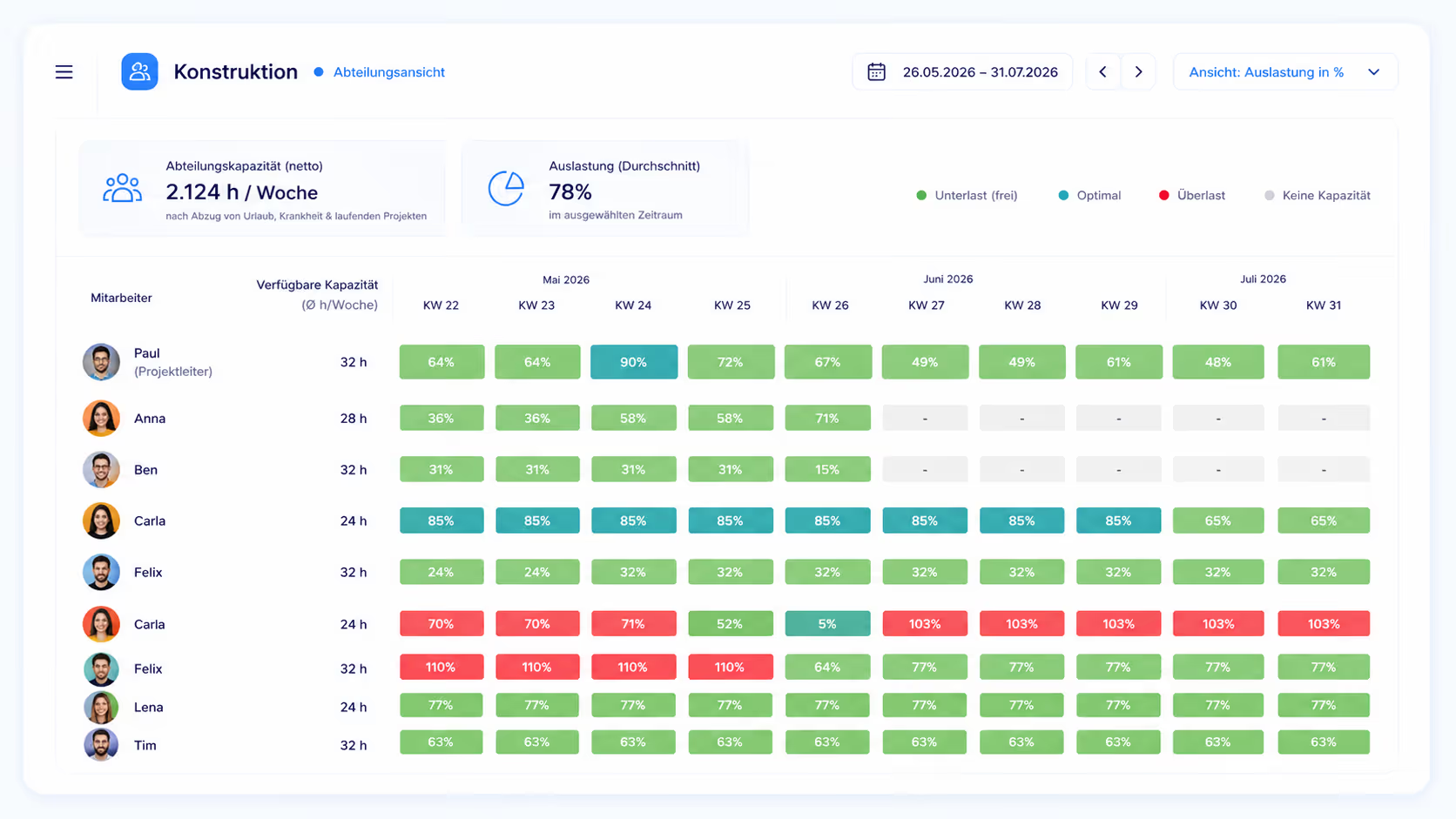
As soon as staff are scheduled, their capacity is blocked. Employees log their work via task tracking – field technicians through the Linetrack mobile app, design engineers through the desktop version as well. That makes it visible at all times what has actually been completed. If an employee finishes early, their resource frees up – the department planner sees it immediately and can reallocate. If a delay occurs, it shows up in tracking right away and can be resolved with an extension, a reschedule, or outsourcing.
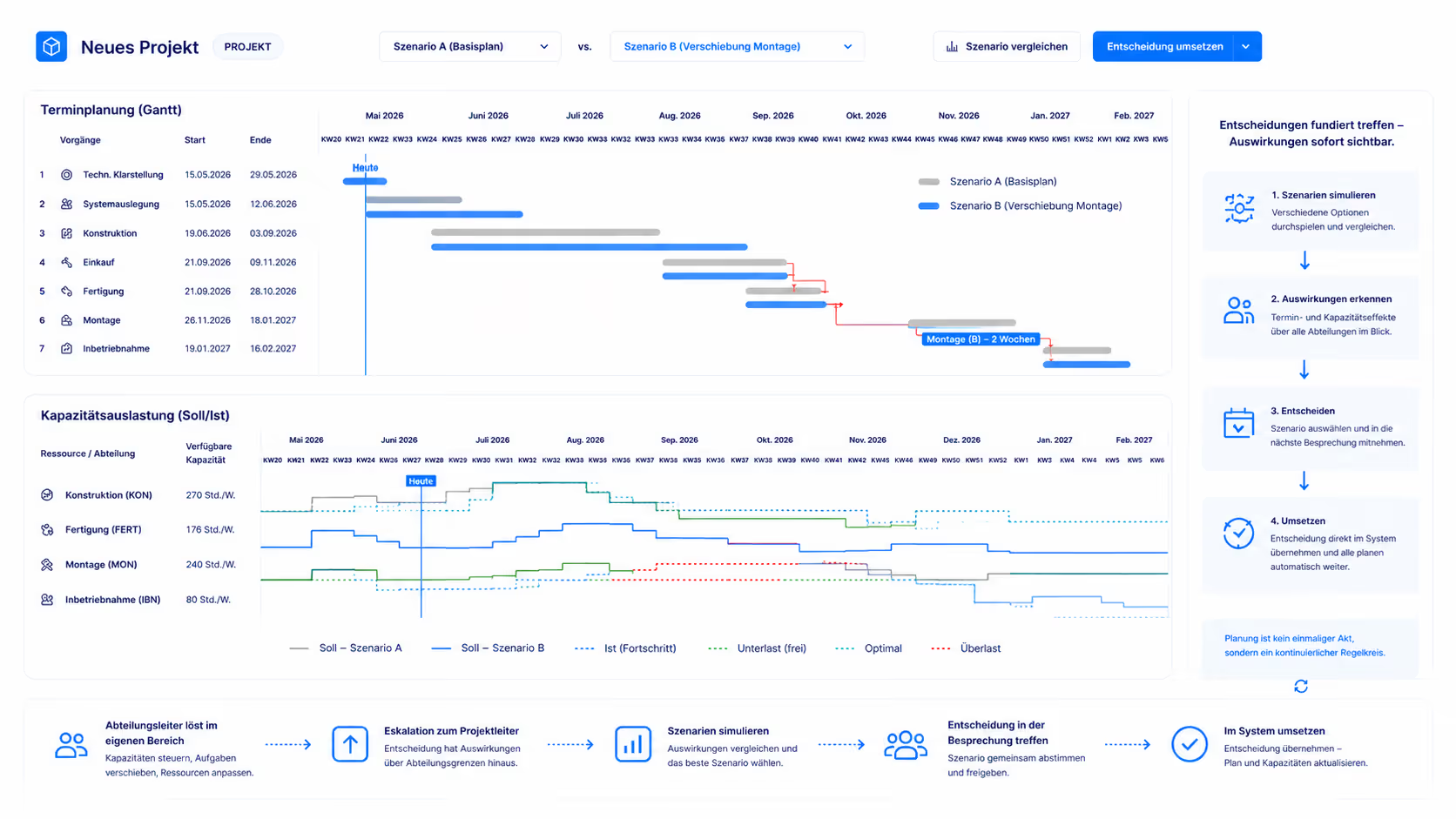
Whatever a department head can resolve within their own area, they resolve themselves. If a decision goes beyond their scope, it escalates to the project manager – who can simulate the impact on other departments directly in the system. Different scenarios get played out, brought into the next meeting, decided there – and the decision is then implemented directly in the system.
At Linetrack, scheduling and capacity planning is therefore not a one-off planning act but a continuous loop of planning, feedback, simulation, and adjustment – in one system, across every level from sales to the individual employee.
Every role sees what it needs
The same data,
the right view for every role
A project manager needs a different view than a department head or a field technician. In Linetrack, everyone works from the same data foundation – but each sees it presented the way their work requires.
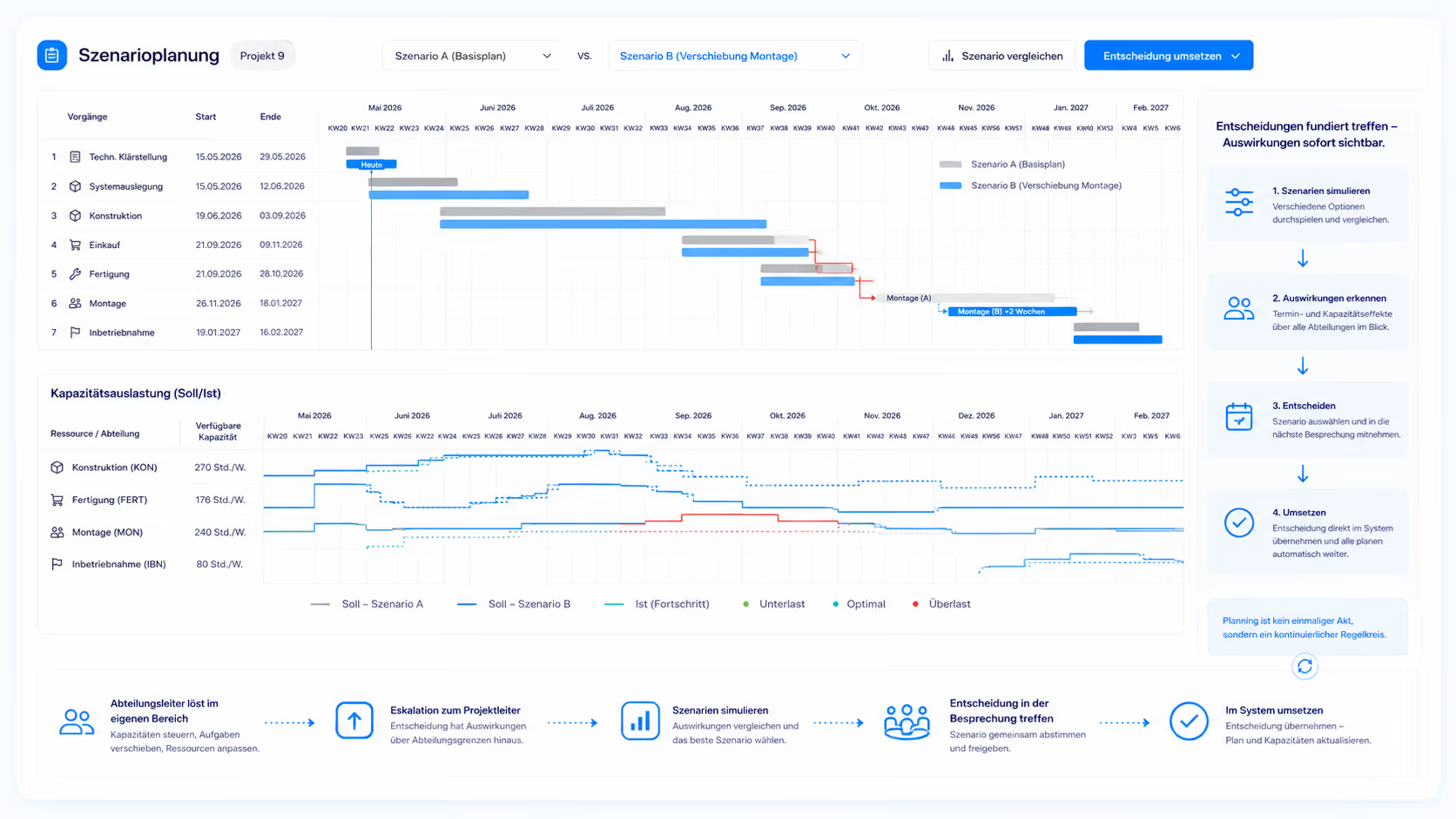
The project manager plans within a single project – with the Gantt chart on top and a capacity histogram directly underneath. The histogram shows available capacity and workload per department across all projects. So while planning one project, they keep an eye on utilization across the whole portfolio. This is exactly where single-project planning effectively becomes multi-project management.
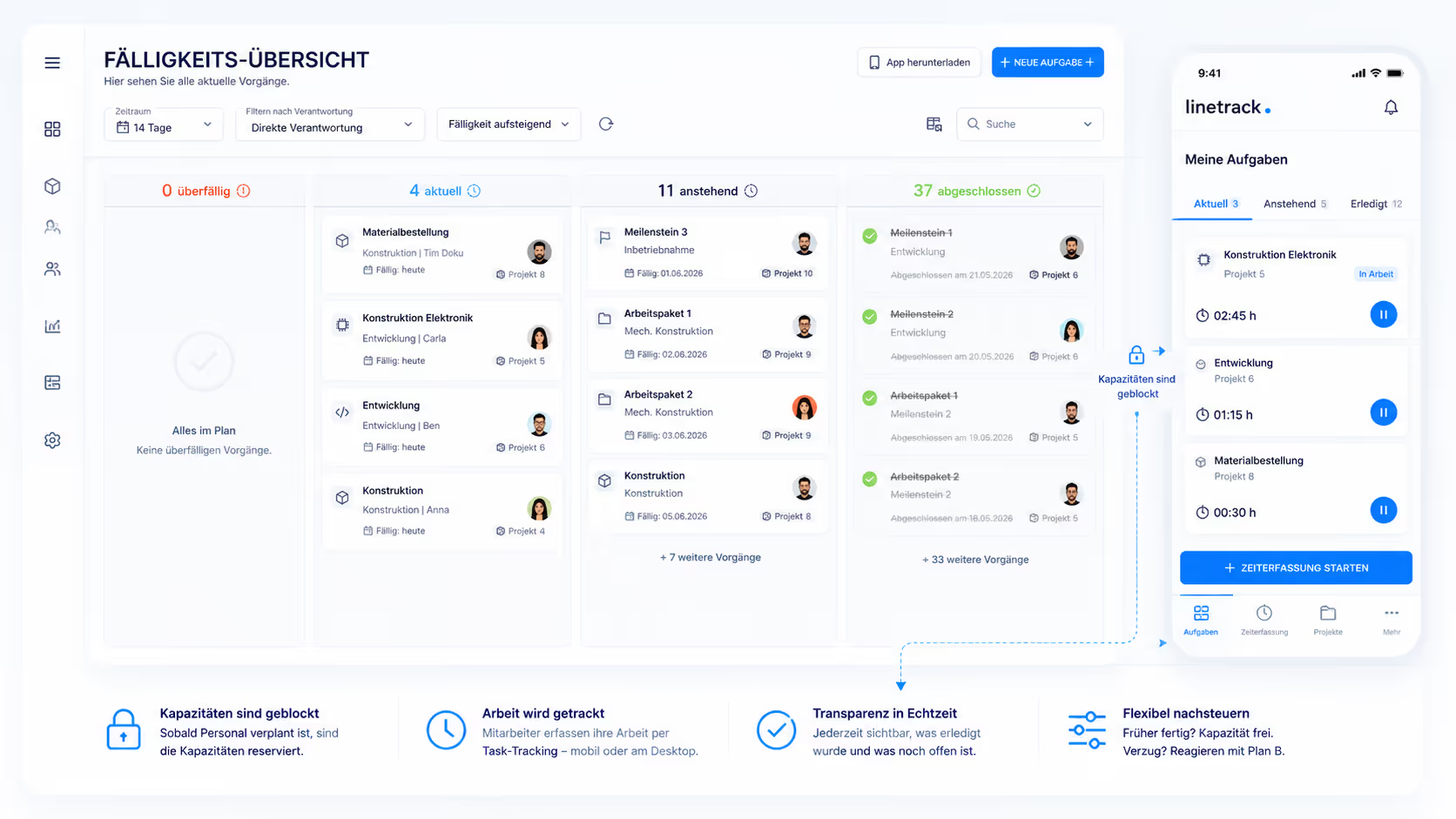
The department head breaks the hour targets down to individual employees – in a clear utilization view. Department capacity results from individual employee availability, minus vacation, sick leave, and ongoing projects. Overloaded employees show up red immediately, free capacity shows up green – making workforce planning manageable at a glance. Sales, project management, departments, and employees all work in the same system this way – without anyone having to transfer data from another tool.
FAQ
Frequently asked questions
Still have questions?
Book a meeting with our team.
What is scheduling and capacity planning in one system?
What is scheduling and capacity planning in one system?
Why isn't pure schedule planning enough in project management?
Why isn't pure schedule planning enough in project management?
How are forecast planning and capacity planning connected?
How are forecast planning and capacity planning connected?
How is workforce scheduling connected to project planning?
How is workforce scheduling connected to project planning?
How do you respond to delays in capacity planning?
How do you respond to delays in capacity planning?
Who is scheduling and capacity planning in one system suited for?
Who is scheduling and capacity planning in one system suited for?
How long does it take to roll out Linetrack?
How long does it take to roll out Linetrack?
How many parallel projects is Linetrack suited for?
How many parallel projects is Linetrack suited for?
Case Study
Planning the team trusts again
Before Linetrack, schedules and capacity lived in separate tools – with conflicting figures nobody trusted. Today, both come together in one data foundation. Project managers and departments work with the same, always-consistent numbers.
„With Linetrack, we've eliminated countless opaque plans."


Learn more
Linetrack in detail
The features behind connected scheduling and capacity planning: