USP
Collaborative
project management
- Everyone plans their own section
- Partial plans connected automatically
- Progress reported back, not chased

In short
Collaborative project management means several roles maintain the same project plan, because one person can no longer keep track of it: sales plans the sales project, project management plans the trades against each other, the departments plan their own tasks. As a requirement on a system, it is only met once every participant can carry out exactly the planning job they used to do in their own list – and the system takes care of the connection between those partial plans. Linetrack delivers this through role-based permissions, department views, and task feedback – in use at Schnaithmann Maschinenbau, STOLL Gruppe, and LANG Technik.









100%
customers named missing
transparency as a reason to buy
59%
named manual status
chasing as a reason to buy
91%
came from Excel and
tool sprawl
1512
projects managed
in parallel
Every figure on this page comes from a full survey of all live Linetrack implementations, as of August 2026. Multiple answers possible – on average, a customer named 3.8 of these points at the same time.
Challenges
Why a project plan goes stale
as soon as only one person maintains it
These four patterns come up again and again in evaluation meetings – measured across all live Linetrack implementations. Multiple answers are possible: on average, a company names 3.8 of these points at the same time.
Nobody has the full picture
Every customer surveyed named missing transparency as a reason to buy, without a single exception. The plan sits with the project manager, the real status sits in the departments. The project manager does not know who in design is currently working on what – and that is not their job either. Between plan and reality there are routinely days or weeks.


The plan runs on status chasing
59% of customers kept their project status current through manual requests: email, phone calls, weekly meetings. Every request costs two people time and delivers a status that is already out of date by the time it is entered into the plan.
Many planners, many islands
91% of customers came from Excel and tool sprawl. The reason is rarely convenience: when several people plan one project, each builds the tool that maps their own part best – design a spreadsheet, assembly a planning board, project management MS Project. Every island makes sense on its own. None of them is connected.
The existing PM system doesn't solve it
56% of customers already had a project management system in place and still switched. The reason is usually the same: the system manages tasks but knows nothing about department capacity – so the departments never maintain it voluntarily.
Definition
What is collaborative project management?
Collaborative project management is an approach in which several roles maintain the same project plan, each within their own remit. The reason for it isn't team spirit, it is complexity: as soon as a project breaks down into sub-tasks owned by different disciplines, one person can no longer plan it through. Project management sets milestones, phases, and targets per department; the departments plan their own tasks and report progress themselves. Status chasing disappears as a separate step, because the plan is built where the work happens.
What that means for a system
A system is only collaborative once every participant can carry out exactly the planning job they used to do in their own list – sales its sales project, project management the trades against each other, the department head their workforce planning. And once the system takes care of the connection between those partial plans instead of loading it onto the user. Everyone keeps doing what they did before – just on an interface built for them.
Distinct from multi-project management
Multi-project management steers many projects side by side – portfolio overview, prioritization, and resource competition between projects. Collaborative project management answers the other question: how several roles work on one plan without overwriting each other. The two depend on each other – collaborative maintenance is what makes a portfolio overview show current numbers at all.
The decisive point
Not the project manager's duty to deliver, but the system's duty to collect
The difference between a classic schedule planner and collaborative project management isn't a feature list – it's the direction in which data is maintained. In a single-user planner, keeping things current is the project manager's job: they have to collect what is happening in the departments and retype it – even though they cannot professionally judge how many hours an assembly takes in design. That works as long as one person can keep track of every plan, and breaks as soon as several departments and projects run in parallel.
Collaborative means the department enters its own share, because it needs that information for its own workforce and capacity planning anyway. Project status then becomes a by-product of departmental work rather than an extra reporting exercise. This is precisely where MS Project and Excel fail – they are single-person tools.
Why a file isn't enough
It is also why a schedule kept in a file never stays accurate for long: a file has exactly one owner. As soon as two departments are supposed to work in it, you get copies, versions, and email attachments with the date in the filename. The plan turns into a document about the work instead of a tool for doing the work.
What Linetrack does differently
Linetrack reverses the direction: every role gets a view that carries its own benefit – the department its utilization, project management its schedule and capacity status, management its portfolio overview. People maintain the data because maintaining it pays off for them. That is why the plan stays current even when nobody is asking.

Every role sees what it needs
Who is allowed to change what –
permissions, roles and ownership
Collaborative does not mean everyone may change everything. Each role holds write permissions for exactly the part it answers for: project management owns structure, milestones and key dates, the department owns effort estimates and who is assigned, the employee owns progress on their own tasks. Anyone who wants to move something outside their own scope raises it as a visible decision instead of quietly overwriting it. How strictly that is applied is up to the company: with a detailed-planning lock, project management only releases a section once the frame is settled – without the lock, departments plan along from day one.
That split only holds because schedules and capacity share one data foundation: feedback from a department moves not just the task but the workload behind it. How that interplay works technically, and which view each role gets, is covered on the scheduling and capacity planning page.
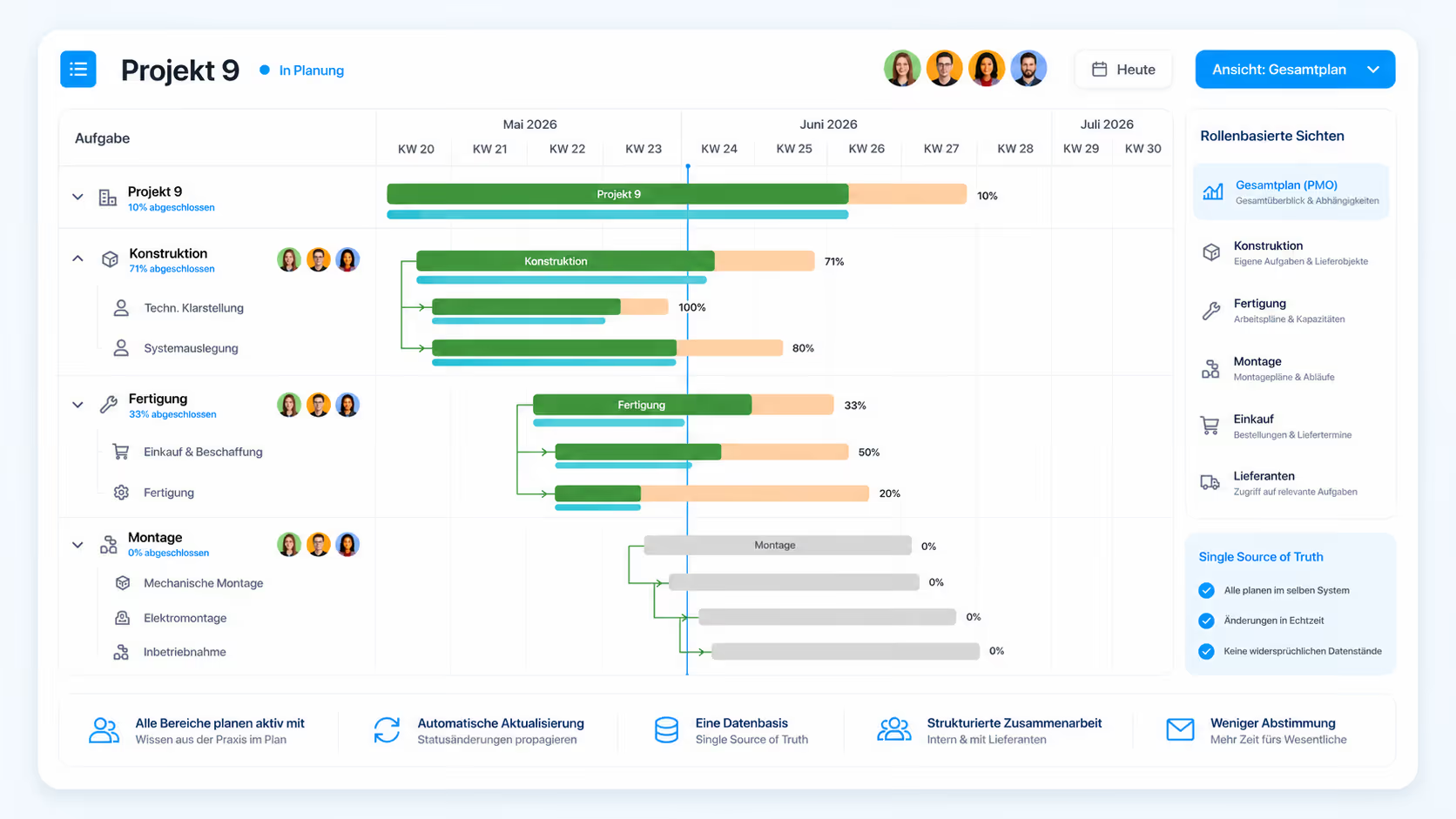
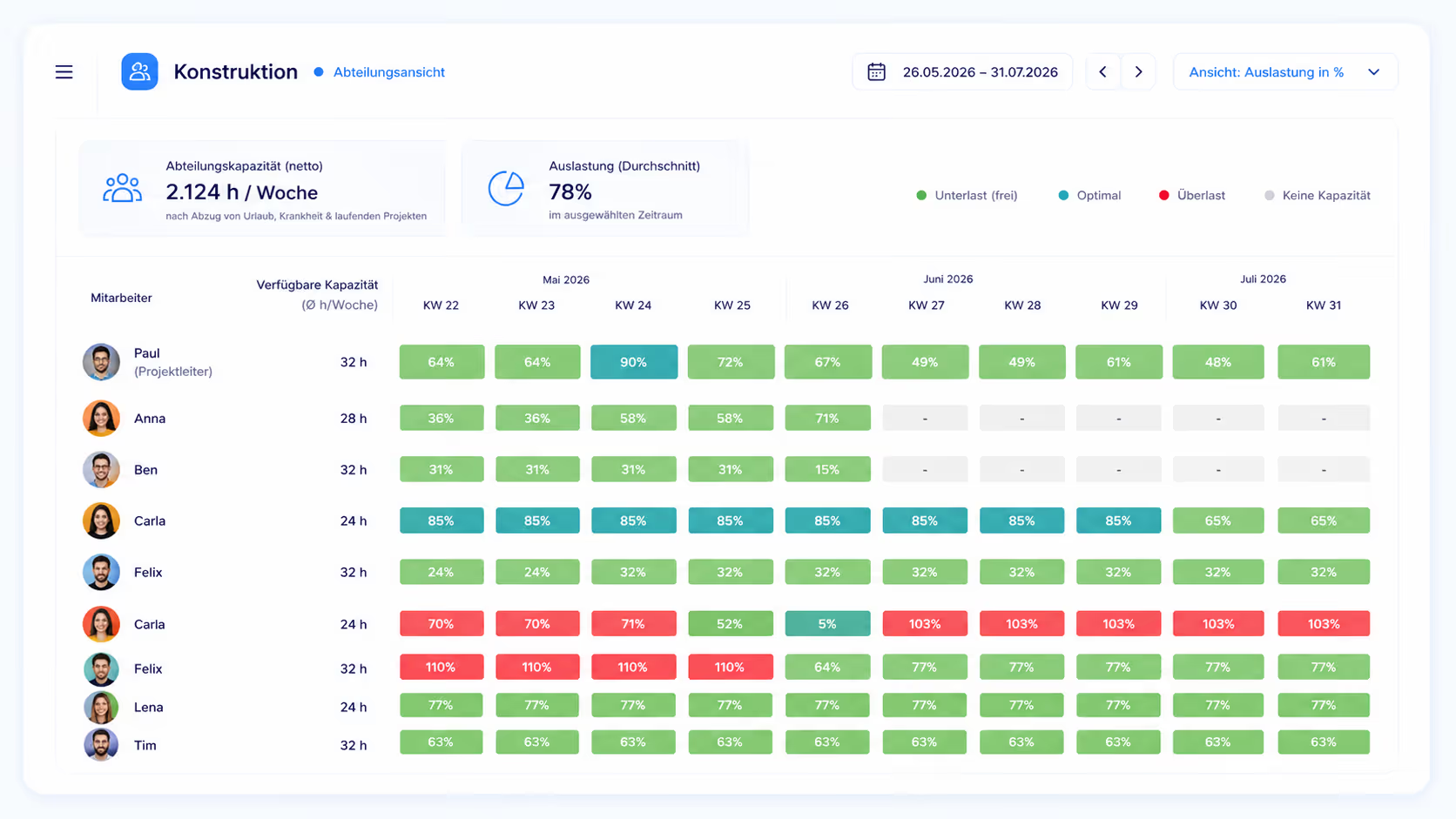
The department head does not work inside the project manager's plan – they work in their own utilization view. There they see every hour target landing on their department, from all projects at once, minus vacation, sick leave, and work in progress. They break those targets down to individual employees and see overloaded people in red, free capacity in green. That view is exactly why they maintain the data: it is their planning tool, not their reporting form.
Instead of status chasing
Project status comes from feedback, not from asking
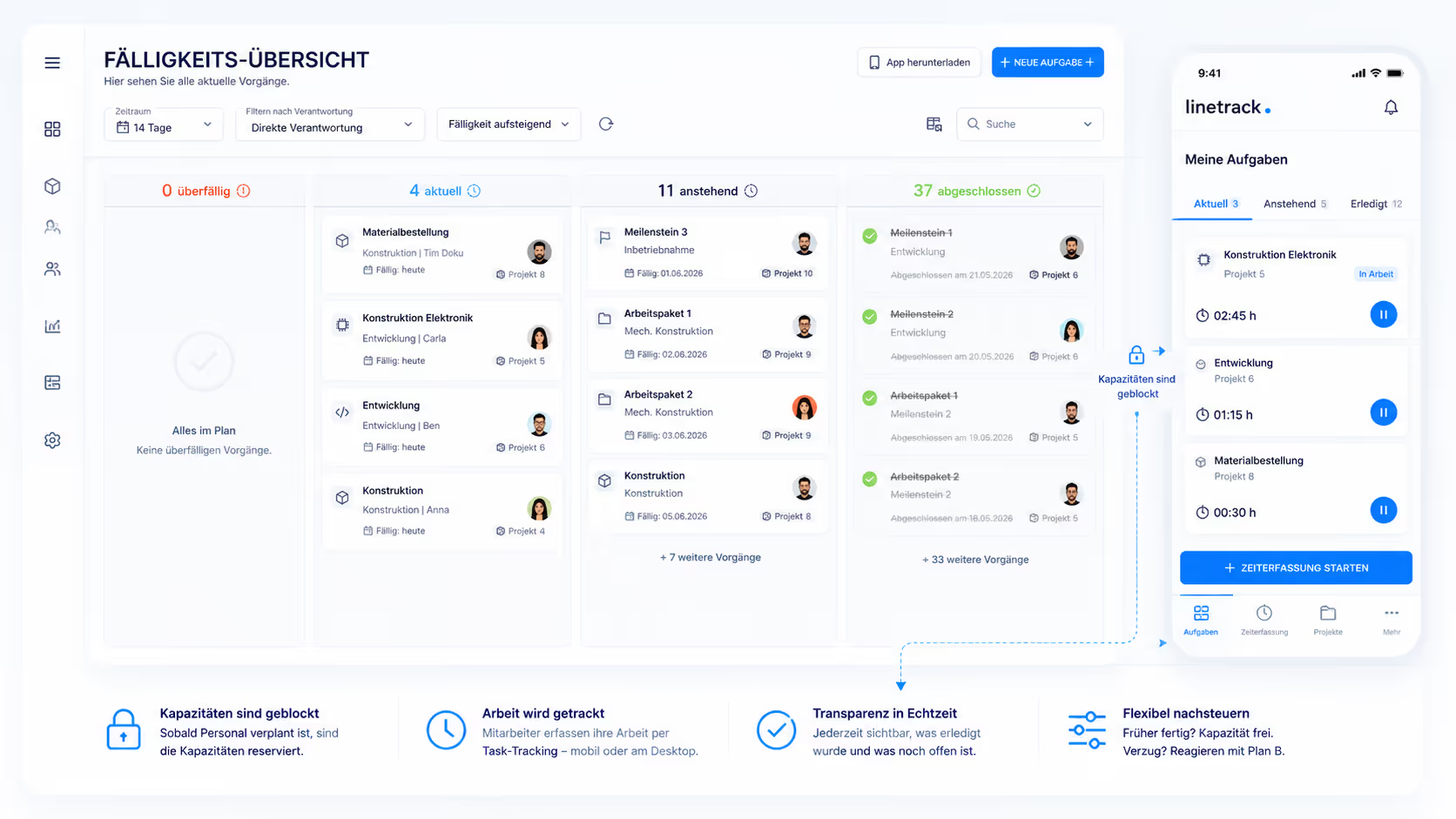
Every department plan ends in concrete tasks for concrete people. Employees see their tasks with dates and planned effort and report progress right there – field technicians through the Linetrack mobile app, design engineers at the desktop. Project status emerges from that feedback, without anyone having to ask for it.
This is where 59% of customers locate their biggest time saving: the loop of emailing, following up, and consolidating disappears. Which task types, feedback modes, and mobile features sit behind it is covered on the task management module page.
The consequence for data quality matters: a plan maintained only by the project manager is as current as their last round of questions. A plan maintained by the departments is as current as the last task ticked off. The visible status no longer depends on the rhythm of the status meeting.
Who maintains what
The flow from sales
into the department
Collaborative planning doesn't work by having everyone drag bars in the same Gantt chart at once. It works through a fixed sequence of responsibilities. In machinery and plant engineering, the same flow has proven itself again and again – from the sales project through the handover to project management down to workforce planning inside the department. How that turns into ongoing project planning and control is shown in these six steps.
What makes it work is that every role has its own reason to maintain its part. As long as maintenance is only a reporting obligation towards someone else, it is the first thing dropped under deadline pressure – and the plan loses its value exactly when it is needed most.
Connected partial plans
What becomes possible once the partial plans compute together
The real gain doesn't come from everyone working in the same program, it comes from their partial plans being linked. As long as sales, design, production, and assembly plan in separate files, every link is manual work: anyone who wants to know what a shift in design means for assembly has to work it out themselves. Once the plans sit in one data foundation, the system knows which task depends on which and which department a change hits.
That produces workflows nobody could automate before: notifications go to the roles a change actually affects, rather than to a distribution list. Queries about dates and effort run as a workflow inside the system, not as an email chain with three rounds of follow-up. And when a task slips or a department runs into a bottleneck, the effect on the end date can be computed in real time across every affected department.
That is where collaborative planning pays off day to day: not the message that something no longer fits, but the answer to which alternative works – redistribute, pull forward, extend, or outsource. How schedules and capacity are computed together for that is covered on the resources and capacity page.
One delay in design, computed across every partial plan
- originally planned
- after simulation
In comparison
Single-user planners versus
collaborative project planning
MS Project and Excel are good tools – for one planner. Both assume that a single person writes a plan and maintains it. As soon as several departments are meant to work on that same plan, both lack what matters: roles, permissions, and a view that is genuinely useful to the department itself. The comparison below shows where that plays out day to day.
The difference isn't a feature list, it is a property of the system: a single-user planner has exactly one author. More plans side by side don't fix that, they multiply the reconciliation work. It shows most clearly in machinery and plant engineering, where the same mechanical designers, electrical designers, and fitters work across several projects at once – there, the department view decides whether a plan gets maintained or not.
Honestly scoped
What collaborative project management explicitly does not mean
Case Study
A plan every department writes into
At Schnaithmann Maschinenbau, project status used to live in separate lists that the project manager had to consolidate before every meeting. Today, design, production, and assembly maintain their own share – project management reads the status instead of asking for it.
A second case study in cross-departmental planning: LANG Technik now plans development and automation projects collaboratively across departments, tracked automatically instead of kept current by asking around.
„With Linetrack, we've eliminated countless opaque plans."


FAQ
Frequently asked questions
Still have questions?
Book a meeting with our team.
What is collaborative project management?
What is collaborative project management?
How does collaborative project planning differ from classic project planning?
How does collaborative project planning differ from classic project planning?
How does collaborative planning run from sales into the department?
How does collaborative planning run from sales into the department?
What is a detailed-planning lock?
What is a detailed-planning lock?
Can everyone change everything in a collaborative project plan?
Can everyone change everything in a collaborative project plan?
How does collaborative project management reduce manual status requests?
How does collaborative project management reduce manual status requests?
What happens when a task slips or a department hits a bottleneck?
What happens when a task slips or a department hits a bottleneck?
Is Linetrack a collaboration tool like Microsoft Teams or Slack?
Is Linetrack a collaboration tool like Microsoft Teams or Slack?
What is the difference between collaborative project management and multi-project management?
What is the difference between collaborative project management and multi-project management?
How do you get departments to actually maintain the plan?
How do you get departments to actually maintain the plan?
Which companies is collaborative project management suited for?
Which companies is collaborative project management suited for?
Learn more
Linetrack in detail
The features that let several roles work on one plan: