Multi-Project Management
Multi-project management
for complex industrial projects
- Schedule projects against free capacity
- Bottlenecks visible early
- Project management and departments in one system

Quick answer
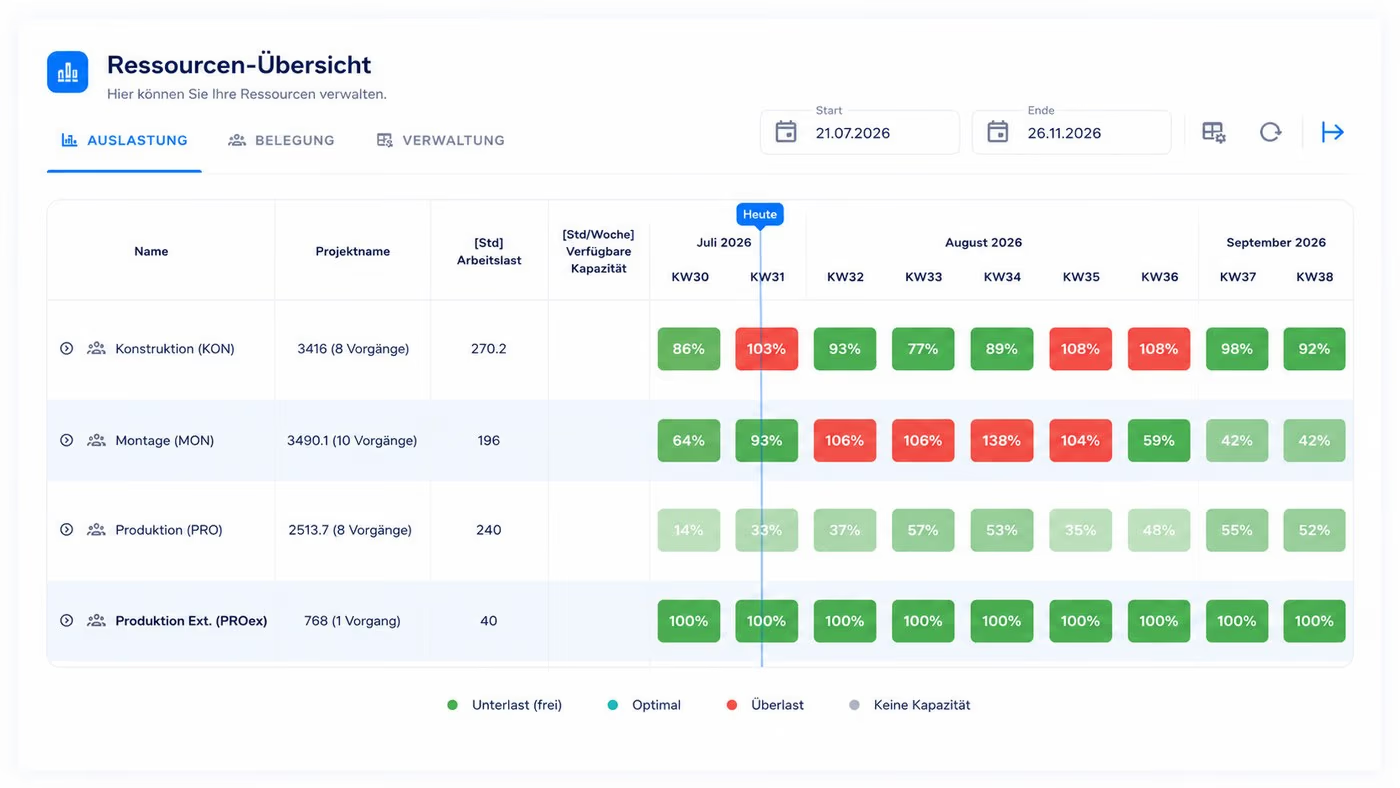
Multi-project management is the central control of several parallel projects that share resources. Project leadership schedules new projects against the capacity that is actually available, monitors the portfolio and decides what happens when a date slips or a bottleneck appears. Department heads add the detailed planning, assign their staff and resolve conflicts inside their own area first; whatever they cannot absorb goes back to the project. Linetrack, based in Stuttgart, holds both levels in one system, with scheduling and capacity planning natively connected. Industrial companies such as Stadler Rail, Schnaithmann, Stoll Gruppe and bavius have completed over 4,000 projects with it and currently run 1,512 in parallel.









270+
parallel projects
at a single customer
400+
replaced Excel lists
and planning tools
1512
projects managed
in parallel
4000+
completed
industrial projects
Figures from live Linetrack implementations, as of August 2026.
Challenges
Typical pain points in
multi-project management
In mechanical and plant engineering, ten to hundreds of projects run in parallel with different timelines, customers and resource requirements. This everyday reality produces four typical bottlenecks – most of which surface too late. We've broken down separately which features a multi-project management software needs to make exactly these bottlenecks visible.
No reliable overview of parallel projects
Excel lists, individual MS Project files and ERP reports each deliver only a partial picture – never a consolidated view. Management and project leadership end up making decisions on outdated data. Every single Linetrack customer named a lack of portfolio transparency as the trigger for adopting the platform – decisions had previously been based on experience and gut feeling rather than numbers.


Invisible dependencies between projects
A delayed component in Project A blocks assembly in Project B. In fragmented tools, this only becomes apparent once the bottleneck has already hit.
Resource conflicts between projects
Multiple projects draw on the same design engineers, fitters and plant technicians. Who is actually free and who is overloaded is nearly impossible to tell from separate project plans.
High manual coordination effort
Status checks by email, phone and meetings eat up hours every week. By the time a status report is ready, it's usually already out of date.
Definition
What is multi-project management?
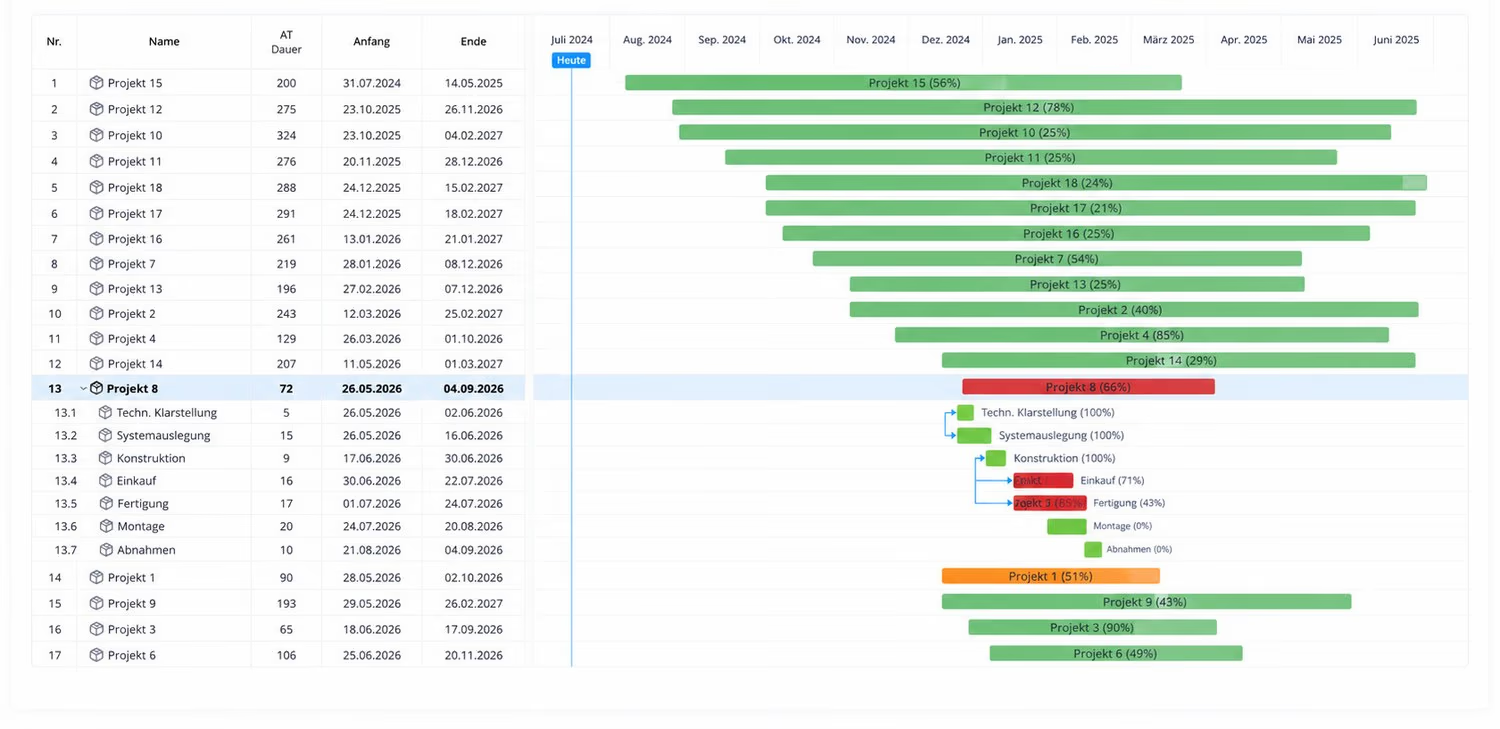
Multi-project management is the central planning, control and monitoring of several parallel projects that share resources and have mutual dependencies. Unlike classic single-project management, it treats all projects as one portfolio – with a view to resource conflicts, priorities and overall progress.
In mechanical and plant engineering, multi-project management is the standard, not the exception: engineering projects, special-purpose machines, plant conversions and service orders run in parallel and share resources such as design, assembly and commissioning. Anyone who falls back to a single-project view here misses the bottlenecks that actually matter.
Roles and process
Who does what
in multi-project management
Multi-project management is not one role's job. Two control loops interlock: project leadership steers across all projects, the departments plan their capacity in detail. What matters is the handover between them.
Solution
Why Linetrack for multi-project management in mechanical and plant engineering?
Generic project management tools are built for simple task lists, not interconnected project landscapes. They fall short on industrial projects with heavy dependencies, interlinked resources and external partners. Linetrack is built differently.
Collaborative, not a PMO island
Project leadership, departments and suppliers plan in the same system – not in separate tools synced up later. Data is entered where it originates and is instantly available everywhere.
Scheduling and capacity in one system
Unique in the market: schedule planning and resource planning are natively connected. No data loss between tools, no conflicting versions, no manual syncing between MS Project and Excel.
Built for industry
Built for complex, plan-driven industrial projects with long timelines and heavy dependencies. Not for software sprints or marketing campaigns. In use in mechanical and plant engineering, building services and construction.
USP 1
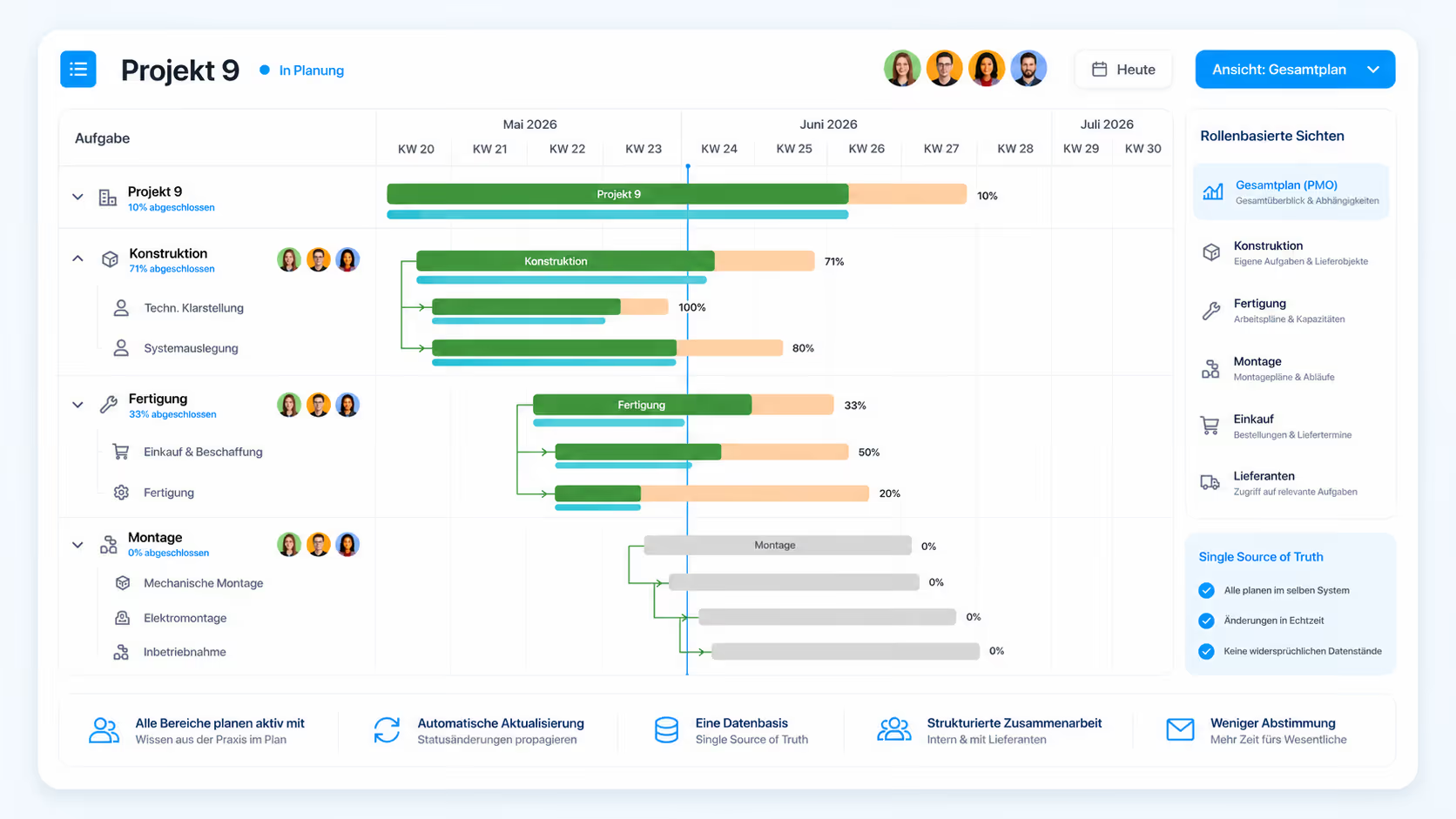
Portfolio level and department level work on the same plan
Project leadership plans milestones and rough dates across every project. The department plans who works on what and when. In most companies those are two separate plans: one in MS Project, one in the department's spreadsheet. Every change has to be carried over by hand.
In Linetrack they are two views of the same plan. The department adds its detailed planning underneath the project tasks, and project leadership sees straight away whether the date still holds. No status reconciliation, no two versions of the truth. Suppliers sit in the same plan instead of being chased by email.
How that split works in detail – who holds which write permissions, why a department maintains its own data willingly, and where co-planning ends and co-deciding begins – is covered on the page about collaborative project management.
Project leadership plans milestones and rough dates across all projects
Design, production and assembly add the detailed planning for their own area
Suppliers get structured access to their tasks and deadlines
Every change propagates into the portfolio immediately, with no status request
USP 2
Scheduling and capacity together in one system
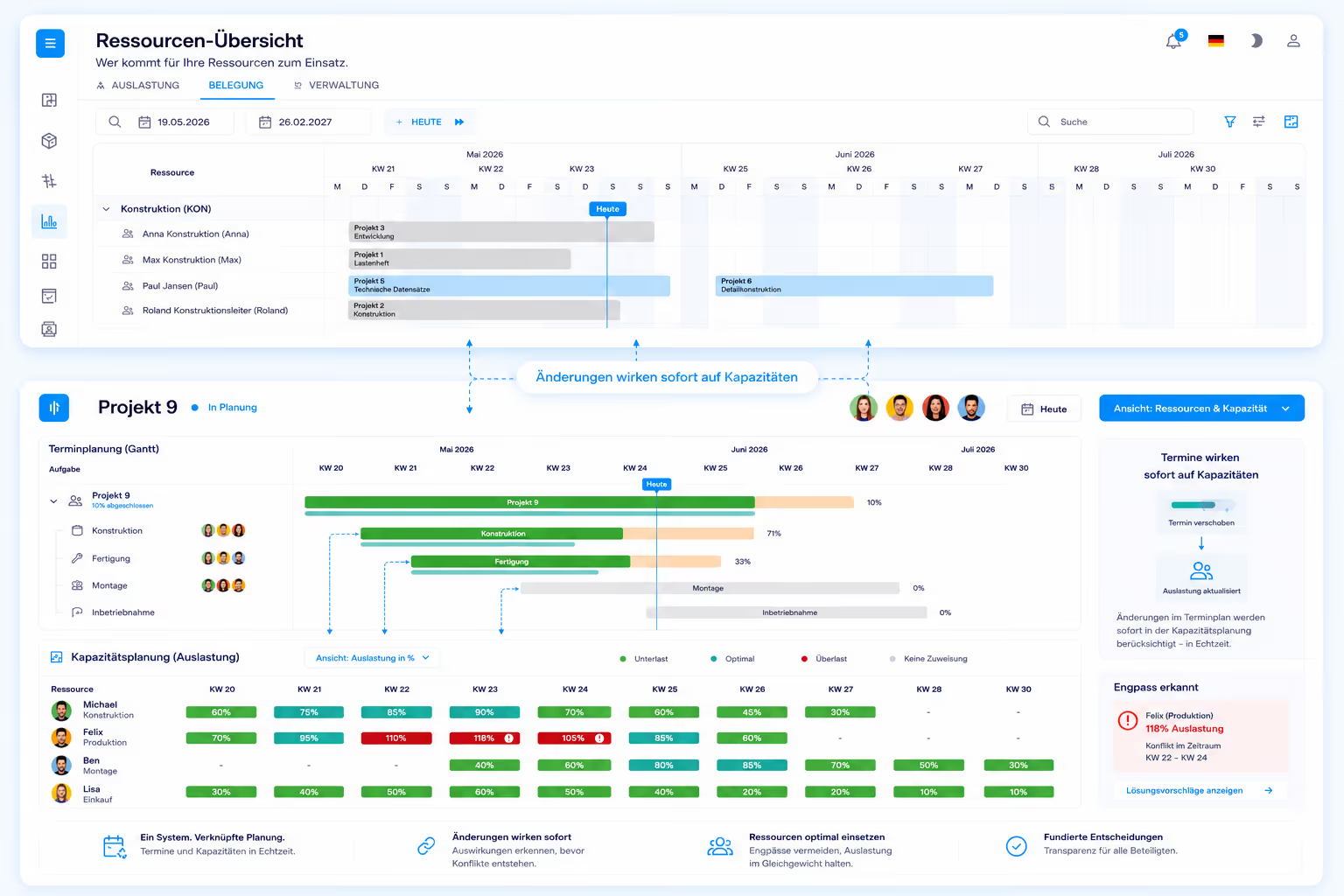
Scheduling and capacity planning in one system means project leadership and departments plan together – schedules and resources are always in sync, with no data loss between tools. Linetrack is the only platform that natively connects both.
At most mechanical engineering companies, scheduling lives in MS Project or Excel while capacity planning sits in a separate resource tool or in ERP reports. Both plans have to be synced manually – with inevitable drift and constant conflicts.
Linetrack breaks down that divide. Move a deadline, and capacity planning reflects it immediately. If a design engineer is out, it directly affects the dependent deadlines. This isn't an interface between two systems – it's one system.
USP 3
Built for mechanical and plant engineering
Linetrack is not a generic project management softwareretrofitted for industry. The platform is built from the ground up for plan-driven industrial projects – with long timelines, many dependencies and shifting resources across design, manufacturing, assembly and commissioning.
That shows in every feature: structure plans for complex machines, plan-vs-actual comparisons spanning months, supplier integration in the schedule, interfaces to time tracking and ERP. Tools built for software sprints or marketing campaigns don't understand these requirements. See how Linetrack stacks up against classic tool landscapes and point solutions in the multi-project management software comparison.
Seamless integration
Interfaces to ERP, time tracking and Office
Linetrack doesn't replace your existing IT landscape – it connects it. Standardized interfaces link Linetrack with the systems commonly used in mechanical and plant engineering.
SAP · ERP (REST) · MS Project · Primavera · Excel · AIDA ORGA · Finkzeit · OptiTime
ERP systems
Project & schedule planning
Time tracking
Office
FAQ
Frequently asked questions
Still have questions?
Questions about cost, rollout and resource conflicts are answered in the multi-project management FAQ. For anything else, book a slot.
What is multi-project management?
What is multi-project management?
Why does an industrial company need multi-project management?
Why does an industrial company need multi-project management?
How does multi-project management differ from classic project management?
How does multi-project management differ from classic project management?
Who is responsible for what in multi-project management?
Who is responsible for what in multi-project management?
How does the multi-project management process work?
How does the multi-project management process work?
How many projects can Linetrack handle?
How many projects can Linetrack handle?
Case study
How Schnaithmann made its project planning transparent
As a mechanical engineering company running over 270 parallel projects, Schnaithmann struggled with fragmented planning data spread across multiple tools. With Linetrack, all projects now come together on a single central platform – with a reliable overview of schedules, resources and status.
"With Linetrack, we've eliminated numerous opaque planning processes."

Learn more
Linetrack in detail
The features behind connected scheduling and capacity planning: