Case study
Schnaithmann Maschinenbau: cross-departmental project planning with Linetrack
- Automation technology
- Assembly and test systems
- Transfer systems
- Special-purpose machinery

What does Schnaithmann use Linetrack for?
Schnaithmann Maschinenbau, a system supplier for automation technology based in Remshalden near Stuttgart, uses Linetrack for cross-departmental scheduling and resource planning. The automation specialist plans projects from the sales phase through to project tracking in a single system. A previously used project management system and the isolated planning lists of individual departments were replaced. The Linetrack team migrated the legacy data and trained the users.
The company
What Schnaithmann builds
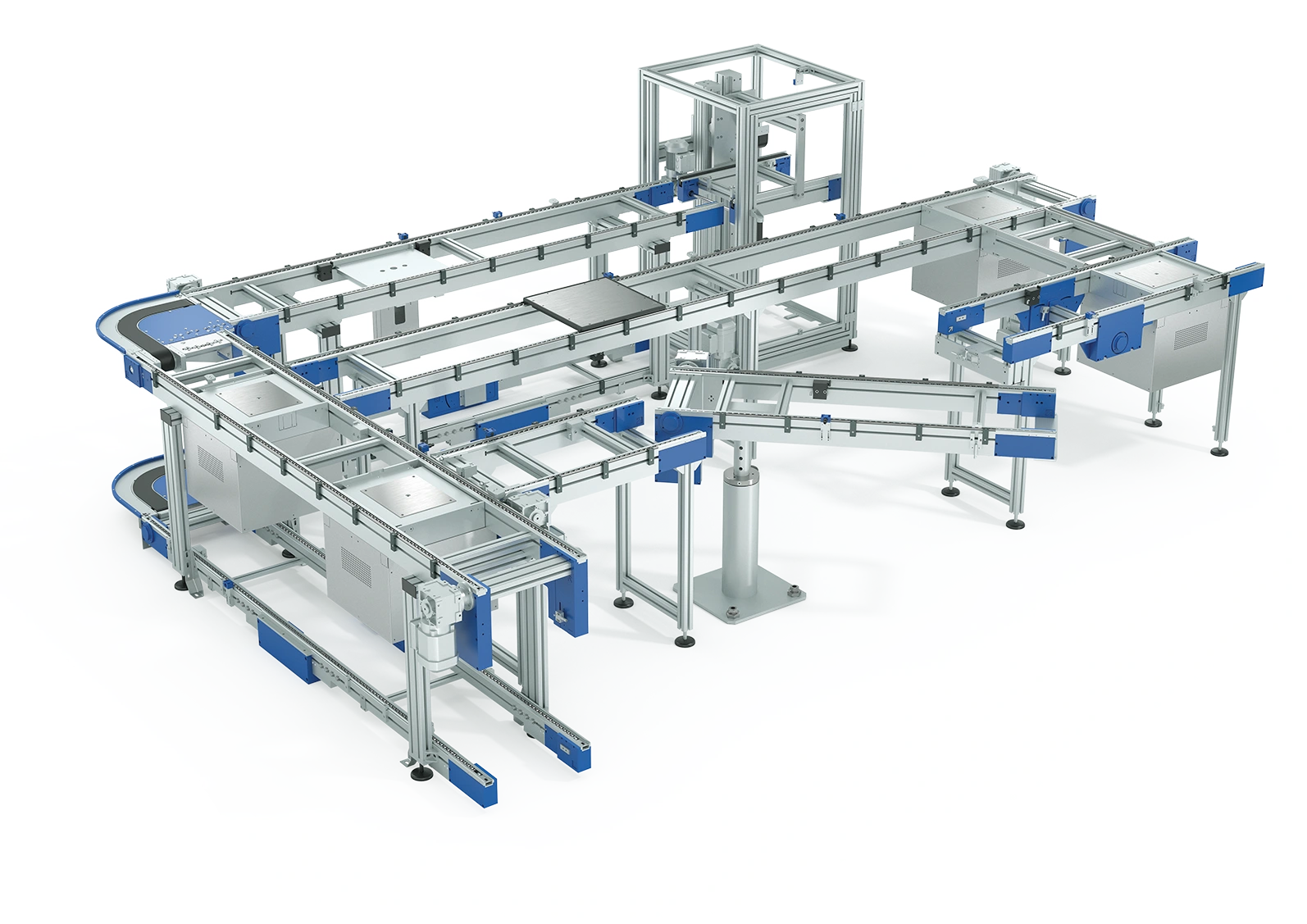
Karl Schnaithmann founded the family business in 1985. Today it is based in Remshalden-Grunbach near Stuttgart and employs 255 people. The portfolio rests on three pillars: flexible profile systems, modular transfer systems, and assembly automation, where both come together into complete assembly and test systems. The systems go into automotive, electronics, consumer goods, building services and renewable energy.
That is where the planning load comes from. An order can be a single workstation solution or a linked production line with robotics and test technology. Design, manufacturing, assembly and commissioning interlock on every larger order, and the same departments serve new systems and RetroFit orders in the installed base in parallel. This is exactly what Linetrack is built for in mechanical and plant engineering – and all the more so in special-purpose machinery with a high engineering share.
Customer voice
“A solution that works”
„Before Linetrack, we used a project management system that didn't give us the transparency we needed in many areas. On top of that, different departments worked with their own isolated planning lists.
With Linetrack, we were able to replace these processes and now have professional, cross-departmental scheduling and resource planning - from the sales phase through to project tracking. We especially value the collaborative way of working and the close support from the Linetrack team, who adapted the software to our requirements, migrated our legacy data, and trained our staff.
For us, Linetrack isn't just another tool - it's a solution that actually works.“

The starting point
How did Schnaithmann plan before Linetrack?
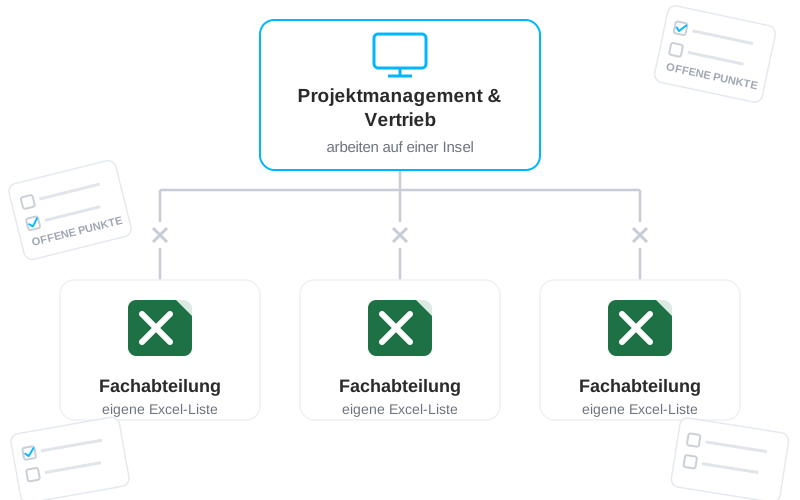
Another project management system was already in place before the switch. It came with plenty of features but was hard to navigate and hard to operate in daily use, and it was slow to load. For what a planning tool is actually for – planning and steering projects simply and efficiently – that was not enough. In the end it was one more island in project management.
Alongside it, the departments kept planning in Excel, staff scheduling above all. Sales ran its own lists, for project costing and for answering suppliers. Exports out of the planning system were unreliable too.
That left several separate systems and lists side by side, each covering one slice of project management. The islands did not interlock cleanly. An end-to-end view of the projects and their planning was only partly possible.
The rollout
From system comparison to a step-by-step rollout
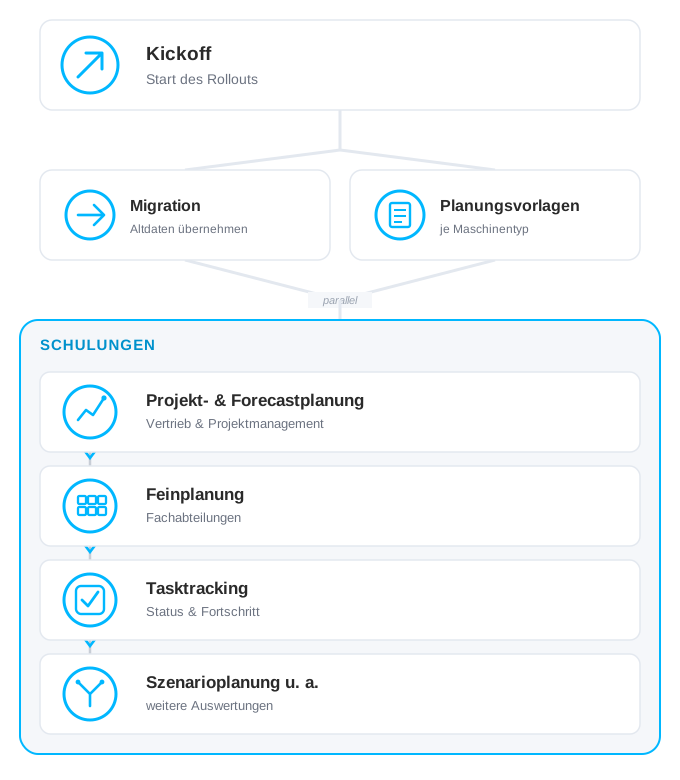
Schnaithmann compared several systems and settled on Linetrack. The rollout started with the migration: project data was exported from the previous system and configured in Linetrack. The account was fully set up before work with it began – the running projects were already in it.
Planning templates for the different machine types were built alongside that. Planning has been standardised and noticeably faster since. Configuration and migration took two to three weeks.
Training followed and was done in around two weeks. Project management first, covering how projects are created and managed, then sales, covering how quoted projects are created and handed over to project management, then the departments one after another.
The internal rollout ran in parallel. Sales and project management first, because the projects had to sit in the system complete and correct – they are the frame the departments plan inside later. The departments joined step by step after that, and the Excel lists were retired one at a time. How that sequence works in general is described under implementing Linetrack.
Interfaces
Staff absences flow from time tracking into the planning automatically. Every holiday and every sick note therefore sits in the capacity figures without anyone entering it a second time.
The solution
What runs differently today
Four things have run differently since the rollout.
One data base instead of planning islands
The sales list, the project plan and the departments’ Excel files have become one system. Linetrack carries the whole planning and steering process on both the schedule and the capacity axis: project management sets the phases and dates, the departments schedule their tasks within them, and planning templates exist for the different machine types. When something moves, the downstream areas see the new start date without anyone updating a file. See collaborative coarse and detailed planning.


Bottlenecks surface while they can still be solved
Because every project draws on the same resources, an overload becomes visible the moment it arises – not once a deadline slips. Linetrack projects the plan forward from the stored resource figures, including the quoted projects that are not orders yet. Anyone deciding whether an additional order still fits into the year sees the utilization of the areas involved across every running project. See resource and capacity planning.
The state of every project, at any time
History and current state sit in the same view, including the delays a project is carrying right now. For project management that means the status report is the system state, not the result of a chasing round. Management looks at the same overview the project managers work in. See multi-project management.
Everyone can see why something happened
When a date moves, the system shows which task moved it and which areas it hits. The handover from sales to project management happens on the same project rather than through a list. That takes the follow-up questions out of the day and makes decisions traceable for the people who did not make them. See tasks and tracking.
The result
End-to-end multi-project management
The separate planning islands have been merged into one system, step by step.
From the rollout
2–3weeks
for configuration and migration. The project data came out of the old system; the account was set up before the first user touched it.
2weeks
for all training, in this order: project management, sales, then the departments.
What holds today
Planning templates per machine type
instead of project plans from scratch. Planning is standardised and noticeably faster.
The Excel lists are retired
department by department, staff scheduling last, which had run in separate files before.
History, current state and forecast in one system
The project state shows the delays being carried; the forecast projects forward from the stored resource figures.
Frequently asked
Questions about project management software in mechanical engineering
Still have questions?
Book a meeting with our team.
What project management software does mechanical engineering use?
What project management software does mechanical engineering use?
How long does it take to introduce multi-project management software?
How long does it take to introduce multi-project management software?
Can Linetrack be connected to an existing ERP?
Can Linetrack be connected to an existing ERP?
What sets Linetrack apart from Asana, Trello or Monday?
What sets Linetrack apart from Asana, Trello or Monday?
Why is Excel not enough for project planning in special-purpose machinery?
Why is Excel not enough for project planning in special-purpose machinery?
Does Schnaithmann Maschinenbau use Linetrack across the whole company?
Does Schnaithmann Maschinenbau use Linetrack across the whole company?
Learn more
Linetrack in detail
The features behind cross-departmental scheduling and resource planning: