Comparison
Linetrack vs.
Trello

In short
Trello and Linetrack work on different levels. Trello organises team tasks: cards on boards, with assignees and due dates, simple and quick to introduce. A mechanical engineering project, however, is not controlled through individual tasks. It needs dependencies such as design before production before assembly, a schedule with a critical path and the load on every department across all projects. Trello does not represent that. Linetrack connects project planning, department planning and task tracking on one data basis, and every status update refreshes the plan. If you need a system for complex projects that replaces the isolated tools between these levels, Linetrack is the better fit.


400+
Excel spreadsheets and
planning tools replaced
56 %
already had a PM system
and switched anyway
59 %
named manual status chasing
as a starting problem
10 days
from kick-off
to go-live
Every figure on this page comes from a full survey of all live Linetrack implementations, as of August 2026. Multiple answers were possible for the starting problems.
Starting point
What Trello was built for
Trello is a visual Kanban board for teams. A board stands for an undertaking or an area of work, and the lists on it for work steps, such as To do, Doing and Done. Every task is a card with assignees, a due date, checklists and comments. Cards move from list to list, and everyone on the team can see who is working on what. Anything missing can be added through Power-Ups. No lengthy onboarding is needed, and costs stay low.
The planning object in Trello is the task. Its date sits on the card and not on a chain of tasks. Whether the department actually has time that week is not a question the board asks. For a team sorting its own work, it does not have to. How task management tools differ from other system categories is covered in the software comparison.
Planning levels
Which level Trello works on
Planning in mechanical and plant engineering happens on three levels. Project management sets the schedule and resource demand, department heads plan their area in detail and assign staff, and staff work through their tasks and report back. In the end, staff scheduling is nothing more than person, task and due date. That is where Trello lives, in task tracking, and it does that job well.
The problem lies between the levels. Today each one has its own tool, and those tools do not exchange data. The schedule in MS Project does not know that the engineering department's Excel sheet is already full for March. The Trello board knows about neither. A tool that covers only one level cannot close that gap, however good it is at that level. Linetrack puts all three levels on one data basis: project management plans at a high level, department heads plan in detail down to individual staff, and status updates arrive directly on the task. The wider context is described on the multi-project management page.
Breaking point
Where the board reaches its limit
Trello's limit is not task management. It is the point where many tasks turn into a project with a chain of dates and departments shared across projects.
None of this is a flaw in Trello. The tool is built for team tasks and does that job. Twenty parallel orders that all need the same designers and fitters call for a different structure: tasks with dependencies and capacity across all projects. How the two fit together is described on the scheduling and capacity planning page.
Core argument
Trello collects tasks, Linetrack controls projects
Agile tools such as Trello, Asana, Monday or Stackfield are built for task management. They answer the question of who does what by when, and they do it with little effort. For a team that wants to make its work visible, that is the right approach.
A mechanical engineering project consists of tasks, but it is controlled through chains of dates and shared capacity. A task management tool does not represent that structure, because at its core it collects tasks. For managing mechanical engineering projects it is therefore not suitable.
The test: ask whether engineering is overbooked in March across all projects. A board cannot answer that, even with carefully maintained due dates. The answer only exists once every task hangs on a scheduled task with a department and all projects sit on the same data basis.
Collecting tasks happens in Linetrack too, on the lowest level. Staff report their status directly on the task, on the desktop or in the mobile app. That turns the planned status into an actual status, to which project management responds with plan-vs-actual comparison and scenarios. If you need a system for complex projects, you need this connection, and a tool for a single level does not provide it. How the pieces work together is described on the collaborative project management page.

Side by side
Trello
versus Linetrack
Seven points that show what each system is built for. Trello stands for the task level, Linetrack for connecting all three levels.
On simplicity, Trello is ahead. A board is set up quickly, and nobody needs task relationships for a plain task list. The remaining rows show what a project involving several departments needs on top. How the bar chart in Linetrack is built is shown on the Gantt planning page. Trello information as of our own research on Trello's product pages, August 2026. Trello develops its features continuously; the current state is on trello.com.
Security & Trust
Your data. Secure in Germany.
Linetrack runs entirely within the EU – hosted with an ISO-certified partner, fully encrypted, and backed up regularly.
Made in the EU
GDPR-compliant
Hosted in Germany
Application, database, and backups run exclusively with Hetzner in the Falkenstein data center.
Fully GDPR-compliant
Your data is processed and stored exclusively within the EU.
ISO/IEC 27001:2022-certified data center
Our hosting partner operates the data center to the internationally recognized ISO/IEC 27001 security standard.
Encrypted in transit and at rest
Data transmission via TLS 1.2/1.3, storage secured with AES-256 encryption.
Multi-tier backups
Hourly, daily, and monthly backups with a typical recovery time of under one hour.
Honest boundaries
When Trello stays the right choice
Not every team needs project control. Four cases in which Trello is enough:
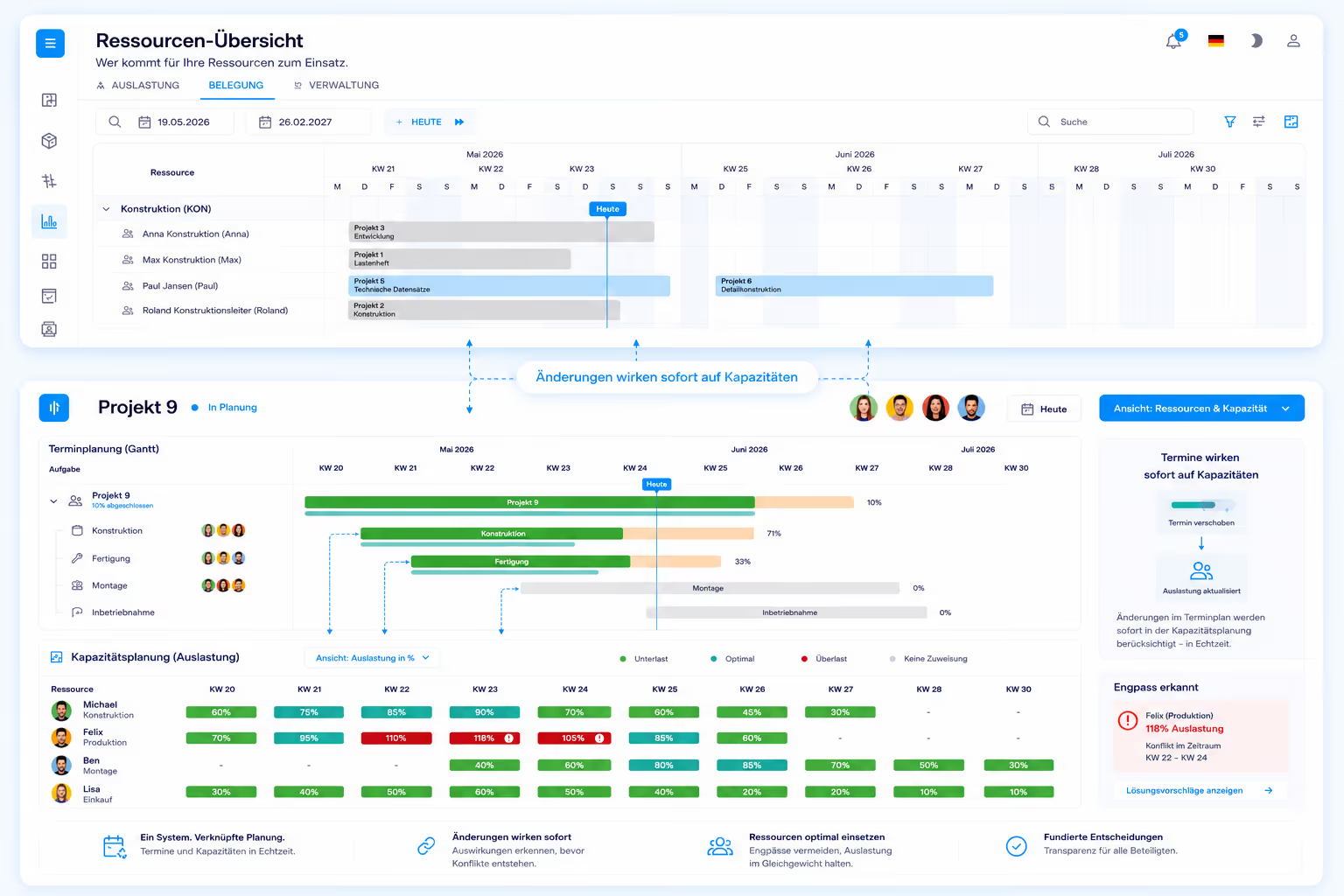
The case where Linetrack makes the difference: several parallel projects, departments that share staff, and dates that depend on each other. At that point a tool for one level is no longer enough, because the connection between project plan, department planning and status updates is missing. Linetrack creates that connection and replaces the isolated tools on all three levels. How that looks in mechanical and plant engineering is described on the industry page.
Migration
How tasks come about in Linetrack
A Trello board contains tasks but no schedule. The move therefore starts with the schedules that usually already exist in the company. Import from Excel, MS Project, Primavera and SAP is a standard feature, so existing plans are read in instead of being typed up again. Staff tasks then follow from the detailed planning of the departments.
Department heads plan their area in detail and assign tasks to individual people with a due date. That is the same information that sits on a Trello card today, except that it now hangs on the project plan. Staff see their tasks on the desktop or on the move and report their status there. What that looks like on a smartphone is shown on the mobile app page.
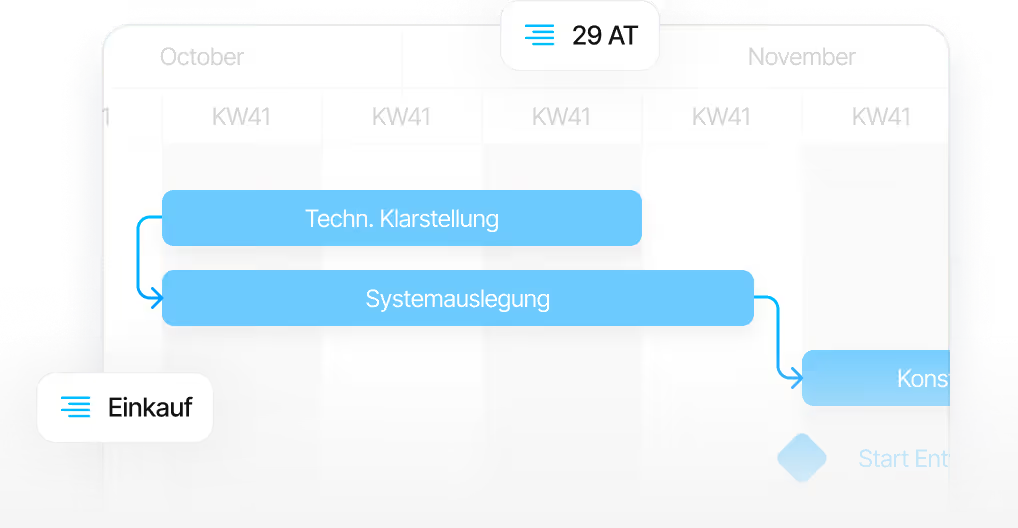
Every status update changes the actual status in the plan. Project management sees deviations from the baseline and can simulate scenarios before rescheduling. Linetrack does not reschedule automatically; people make the decisions. It takes ten working days from kick-off to go-live. The process is described on the implementation page.
FAQ
Frequently asked questions
Still have questions?
Book a meeting with our team.
What is the difference between Trello and Linetrack?
What is the difference between Trello and Linetrack?
Is Trello suitable for project management in mechanical and plant engineering?
Is Trello suitable for project management in mechanical and plant engineering?
Can Trello represent dependencies between tasks?
Can Trello represent dependencies between tasks?
How does task tracking work in Linetrack?
How does task tracking work in Linetrack?
How does the move from Trello to Linetrack work?
How does the move from Trello to Linetrack work?
What does Linetrack cost compared with Trello?
What does Linetrack cost compared with Trello?
More comparisons
Learn more
Linetrack in detail
The modules behind connecting project planning, detailed planning and task tracking: