Project Management Software: Frequently Asked Questions

The most important questions about project management software, answered: basics, selecting a tool, planning and control, and costs and rollout.


Illustration: a list of questions beside a large question mark

Anyone looking into project management software for the first time runs into the same core set of questions, regardless of industry or company size. This page collects the most common ones: from the basics of project management, to choosing the right software, to costs and rollout.

What Is Project Management Software?

Project management software brings planning, control, and tracking together in one system, instead of coordinating them across scattered spreadsheets, emails, and meetings. At its core, it covers four tasks: structuring projects and tasks, scheduling dates and dependencies, assigning resources and capacity, and making progress visible — ideally in real time rather than in a weekly status meeting.
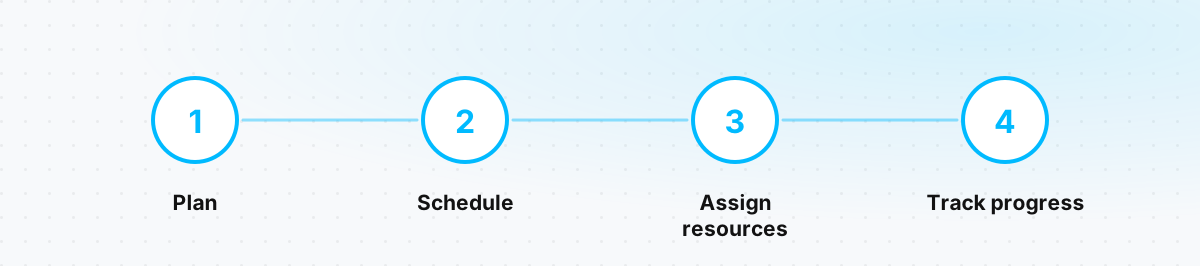
The four core building blocks of project management software: planning, scheduling, assigning resources, tracking progress
Four tasks every project management software covers at its core.

The answers below are grouped into four blocks: the basics of project management, tools and how to choose one, planning and control during a live project, and costs and rollout. For Linetrack-specific detail, see the task management and planning & control pages.

FAQ

Basics

What Is a PM Tool?

A PM tool (project management tool) is software that supports the planning, control, and monitoring of projects: schedules, tasks, resources, and progress come together there instead of being scattered across Excel sheets and emails. Depending on the category, a PM tool covers only a slice of that work — pure task management, scheduling, or resource planning — or connects several layers in one system. Linetrack, for example, brings scheduling and capacity planning together natively instead of syncing them across separate tools.

What Does Project Management Cover?

Project management covers the planning, execution, monitoring, and closure of a time-bound undertaking with a defined goal. At its core that includes: defining goals and building a work breakdown structure, scheduling, resource and capacity planning, budget and cost control, risk management, quality assurance, and ongoing communication with everyone involved. In practice these disciplines constantly overlap — a schedule change immediately affects capacity and budget, which is why professional project management treats them as one connected picture rather than in isolation.

What Are the Three Essential Functions of Project Management?

The classic breakdown names planning, directing, and controlling as the three core functions. Planning sets goals, schedules, resources, and budget. Directing carries the plan out, coordinates the people involved, and makes decisions when things deviate. Controlling continuously compares the actual state against the plan and provides the basis for corrections — in essence, an ongoing plan-vs-actual comparison. All three functions do not run one after another; they run in parallel, repeatedly, throughout the entire project.

What Are the Six Main Elements of Project Management?

Six elements are commonly named as the frame a project is built on: scope, time, cost, quality, resources, and risk. Scope defines what is included in the project and what is not. Time and cost set the frame for schedule and budget. Quality defines which requirements the result has to meet. Resources cover personnel, materials, and machines. Risk describes the systematic handling of uncertainty before it becomes a problem. These six elements interact: change one — shorten the timeframe, say — and it immediately affects at least one of the others.

What Are Project Management Methods?

Broadly, three approaches can be distinguished. Classic or waterfall project management plans the project fully in advance, in sequential phases — suited to work with stable requirements and tight dependencies between trades, such as mechanical and plant engineering. Agile methods such as Scrum work iteratively in short cycles with evolving requirements — common in software development. Hybrid approaches combine both: a coarse, scheduled frame with agile detailed planning inside individual sections. Which method fits depends less on the industry than on the nature of the dependencies — the firmer the delivery dates and the tighter the resource coupling, the more a plan-driven core carries the work.

Why Is Communication Important in a Project?

Because a plan is only as good as the information that actually reaches everyone involved. Missing or delayed communication is one of the most common causes of failed projects — not because the plan itself was wrong, but because a change did not reach everyone it affected in time. Especially in projects spanning several departments and external partners, communication decides whether schedule slips and bottlenecks become visible early or only once the damage is already done. That is exactly why collaborative systems such as Linetrack are built so that status changes propagate automatically to everyone concerned instead of being chased down through email chains and meetings.

FAQ

Tools and Selection

What Are Common Project Management Tools?

The market can broadly be split into categories, each covering a slice of project work: task tools with boards and lists for day-to-day work organization, scheduling tools with Gantt charts for planning individual projects (such as MS Project), spreadsheets like Excel for flexible homegrown solutions, ERP project modules for costing and controlling, and specialized resource and capacity planning tools. Most companies run several of these categories in parallel — with the downside that data between them has to be reconciled by hand.

What Are Well-Known Project Management Tools?

Well-known does not automatically mean well-suited. Most widely known tools are built for broad use cases — task management for small teams, software development, marketing campaigns — and deliberately kept generic so they work across every industry. MS Project, for instance, is a solid, well-known tool for scheduling individual projects, but it does not automatically connect that schedule to department capacity, and the plan usually lives locally on the project manager's machine. For plan-driven industrial projects with shared resources across several departments, that often means combining several tools — or using a platform like Linetrack's multi-project management, which ties schedule and capacity together from the start.

Why Use PM Software?

Without software, schedules, resources, and status typically end up spread across separate Excel sheets, emails, and the project manager's head — and as the number of projects grows, that state becomes error-prone and opaque. PM software creates a shared data basis: changes become visible immediately, the effect on other projects or departments can be checked before a date is committed to, and status calls by phone become unnecessary. The benefit scales with complexity — a single project with no dependencies needs it less; once several projects compete for the same resources, software turns from a convenience into a necessity.

What Does a Software Project Manager Do?

A project manager working with PM software carries out essentially the same tasks as in any other project: setting goals and scope, breaking the project into work packages, planning schedule and resources, tracking progress, and steering when things deviate. The difference is the tool: instead of collecting status by email, the project manager works from a central, usually real-time data basis that departments maintain themselves. That shifts the role from data collector to decision-maker — time that used to go into status calls is freed up for prioritization and risk management.

FAQ

Planning and Control

What Belongs in Project Planning?

Project planning splits into two interlocking levels: coarse planning, which divides the project into scheduled sections and is usually created by project management, and detailed planning, where departments plan their task areas in detail and assign them to named individuals. On top of that comes a work breakdown structure, which organizes the project into manageable task areas with clear responsibilities, and schedule planning in a Gantt chart, which makes dependencies between tasks visible. More on how coarse and detailed planning interlock is covered in the overview on project planning and control.

What Is Project Monitoring?

Project monitoring is the ongoing observation of a project during execution: are schedules being kept, is resource utilization within range, are costs developing as planned? Unlike a one-off status check, monitoring is continuous — it provides the data basis on which steering decisions get made before a small deviation turns into a schedule risk. In practice, monitoring runs through dashboards that show utilization, open items, and critical dependencies in real time, rather than monthly status reports that are already outdated by the time they land.

What Is a Plan-vs-Actual Comparison in Project Management?

A plan-vs-actual comparison sets planned figures — dates, hours, cost — against what was actually achieved, and surfaces deviations as they arise instead of only at project close. That makes it the central tool of project control: without it, there is no way to tell whether a project is on track or whether delay is already building up unnoticed. A detailed look at the method and its practice is on the plan-vs-actual comparison page. What matters in practice: a reliable comparison needs actual data that flows back without duplicate entry — for example through an interface to time tracking, instead of manually maintained timesheets.

What Is Project Tracking?

Project tracking is the systematic recording of actual progress on individual tasks — who is working on what, what is finished, what is overdue. It is the operational basis for both monitoring and the plan-vs-actual comparison: without reliable feedback from execution, both remain estimates rather than a real picture. In practice, project tracking works most reliably when it happens directly inside people's day-to-day work — through task status that employees maintain themselves — rather than through additional reports produced alongside the actual work.

What Resources Are Needed to Carry Out a Project?

Six types of resources are typically in focus: personnel with specific qualifications, machines and equipment, materials and components, financial resources, spaces and infrastructure, and time as the overarching factor tying together all the others. How these resources are systematically planned, assigned, and matched against actual demand is covered in detail in the article on resource management; how bottlenecks become visible early is covered in the article on capacity planning. Once several projects compete for the same resources, resource planning for a single project turns into a question of multi-project management — covered in detail in the dedicated multi-project management FAQ.

FAQ

Costs and Rollout

Still Have Questions?

This overview covers the most common starting questions. For questions specifically about running several projects in parallel and sharing resources across them, the multi-project management FAQ is worth a look. To see straightaway what connected scheduling and capacity planning look like in practice, the simplest next step is to book a demo.

What Does Project Management Software Cost?

Prices range from free, functionally limited tools to systems costing five figures a year — the difference usually comes down to feature scope and whether a solution grows modularly with the company. Linetrack, for example, starts at 10 € per user and month under a modular licence model based on user count, roles, and the feature modules booked — companies start with the modules they need and expand step by step. What matters for comparison: the licence price is only part of the cost. Consulting, system setup, and migrating existing plans usually come on top and are quoted separately.

How Long Does It Take to Roll Out Project Management Software?

That depends heavily on the vendor and scope, but one example makes it concrete: at Linetrack, the median time between kick-off and the first project a customer plans themselves is 10 working days. The full rollout across all departments — including interface connections — continues step by step afterwards and depends on how many departments are involved and how much legacy planning has to be migrated. Details on the process are on the implementation page.

Does Project Management Software Replace Excel Entirely?

Not necessarily, and certainly not on day one. In practice, new software first runs alongside existing Excel sheets — until ongoing projects are migrated and everyone involved is working in the new environment. With a good solution, existing schedules from Excel and MS Project can be imported directly instead of being re-entered from scratch. Whether Excel disappears entirely afterwards depends on the individual case: it often stays in use for quick notes, but for actual project and capacity planning it should be retired — otherwise two parallel versions of the truth appear again.

What Data Can an Interface Connect to Project Management Software?

Typically three kinds of data: absences and working-time models from time tracking or HR, as the basis for realistic capacity planning; orders, project numbers, and master data from the ERP system, so the project structure is not maintained twice; and actual hours, which flow back automatically into the plan-vs-actual comparison. Existing schedules from MS Project, Primavera, and Excel can additionally be imported as a one-off. A detailed overview of which systems can be connected and how the process works is on the interfaces and integrations page.

How Many Projects Can Project Management Software Manage at Once?

That depends on the software, not on a fixed ceiling — modern, browser-based systems are generally built to handle many parallel projects. Once several projects start competing for the same people, machines, or dates, though, scheduling per project on its own is no longer enough; that is when multi-project management with a cross-project capacity view is needed. How that works in detail, and from what point it pays off, is answered in the dedicated multi-project management FAQ as well as the multi-project management overview.

What Company Sizes Is Project Management Software Suited For?

Any size, in principle — from a single person running a few projects to an industrial company managing hundreds in parallel. The difference lies in the right feature scope: a small team rarely needs more than task management and a simple schedule, while companies with several departments and shared resources benefit from a connected schedule-and-capacity view. Modular licence models such as Linetrack's account for that: companies start with the modules they need right now and expand as the number of projects grows — instead of paying for unused features from day one.

What Is the Difference Between Project Management Software and an ERP System?

An ERP system is built for controlling, order processing, and resource planning across the whole company — its project module usually covers only costing and cost posting within the work breakdown structure, not operational scheduling and capacity planning. That is exactly why detailed scheduling often ends up back in Excel in practice, even where an ERP is in use. Project management software such as Linetrack does not replace the ERP; it adds the planning view on top: interfaces keep master data in sync, while schedules and capacity get planned where they are actually needed.