Multi-Project Management: Frequently Asked Questions

The key questions about multi-project management: definition, resource conflicts, dependencies, and choosing the right software – for industrial projects.

Illustration: several project lanes converging on one portfolio view

This page collects the most common questions about multi-project management – from the definition, through resource conflicts and dependencies between projects, to choosing the right software. The underlying approach, USPs and figures behind Linetrack are covered in detail on the multi-project management page. Anyone looking for general questions about managing a single project will find them in the project management FAQ – this page deliberately focuses on the portfolio and multi-project perspective.

What Makes Multi-Project Management Different?

In a single project, the resource question is usually simple: one team, one plan, one priority. Once several projects run at the same time, they share the same people, machines, and time slots – and a date that slips in project A can affect project B and C without that being obvious at first glance. Multi-project management makes exactly these dependencies and capacity bottlenecks visible across every running project, instead of discovering them only once they turn into a conflict.
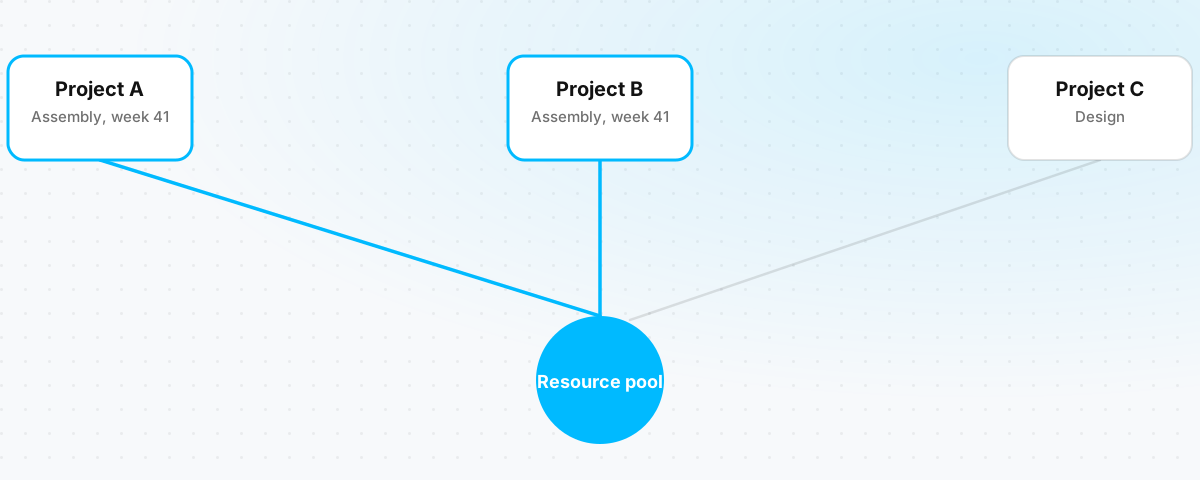
Three parallel projects share one common resource pool, a conflict is flagged where they overlap
Several projects, one shared resource pool – conflicts become visible before they escalate.

FAQ

Fundamentals

What is multi-project management?

Multi-project management is the central planning, control and monitoring of several parallel projects that share resources and have mutual dependencies. Unlike classic single-project management, it does not look at one project in isolation, but treats all running projects as a portfolio – with a view to resource conflicts, priorities and overall progress. The two core USPs behind Linetrack, collaborative planning and connected scheduling and capacity planning, are described in detail on the multi-project management page.

Why multi-project management?

In mechanical and plant engineering, ten to hundreds of projects typically run in parallel, sharing design, manufacturing, assembly and commissioning as resources. Without dedicated control, dependencies between these projects stay invisible, resource conflicts appear at short notice, and status checks by email and phone eat up hours every week. Multi-project management creates the portfolio view needed to decide which project takes priority when resources are scarce – before a bottleneck turns into a schedule risk.

How do I manage several projects at the same time?

The starting point is a shared data foundation instead of separate plans per project: all running projects become visible together with their respective resource load, instead of isolated Gantt charts sitting side by side. Building on that, you need firm rules for prioritization and escalation for when two projects claim the same person or machine. How this combination of a shared data basis, capacity matching and clear escalation paths works day to day is described in the scheduling and capacity planning use case.

How does multi-project management differ from classic management of a single project?

Classic project management plans and controls a single undertaking – schedules, tasks, budget. Multi-project management builds on that and adds the portfolio layer: which projects are running in parallel, who is working on which one, and which project takes priority when two undertakings need the same people? The methods of single-project management stay relevant; they are simply extended with the cross-project view. Fundamental questions about managing a single project are answered in detail in the project management FAQ.

What does portfolio transparency actually mean in multi-project management?

Portfolio transparency means that the status, schedules and resource load of all running projects are visible in one place – not scattered across Excel lists, individual MS Project files and ERP reports that each deliver only a partial picture. A lack of portfolio transparency is, in practice, the most common trigger for companies to look for multi-project management software in the first place: decisions were previously made on experience and gut feeling rather than solid figures.

When does multi-project management pay off for a company?

Multi-project management becomes relevant as soon as at least two projects run at the same time and share resources such as design engineers, fitters or plant technicians – at that point, the portfolio view, not isolated single-project planning, decides whether a new order is even feasible at the requested date. What matters is not company size, but whether projects run in parallel, depend on one another, and carry fixed delivery dates. Where the line sits at which another software category is the better fit is covered by the multi-project management software comparison.

FAQ

Resources, Capacity and Dependencies

How does resource planning work in multi-project management?

Resource planning in multi-project management does not match the demand of a single project against its own capacity – it matches the demand of all parallel projects against the same, shared capacity of design, manufacturing and assembly. Every project is automatically translated into its impact on departmental utilization – only that makes it visible whether a new order can be accepted before the delivery date is committed to. A detailed look at the methods is in the article Resource Management in Projects; how scheduling and resource planning run together in one system is covered by the scheduling and capacity planning use case.

How do you spot dependencies between several projects?

Dependencies between projects become visible when tasks are linked to each other across project boundaries – for example when a delayed component in project A blocks assembly in project B. In fragmented tool landscapes with separate plans per project, this only becomes apparent once the bottleneck has already occurred. A central plan that keeps all projects and their shared resources in one data foundation makes such dependencies recognizable in advance, rather than after the fact.

How do resource conflicts between projects become visible before they escalate?

A resource conflict arises when two projects need the same person or machine during the same period. That only becomes visible once every project is automatically translated into the utilization of the relevant department – the overload then shows up as a number, not as a missed deadline. What-if scenarios additionally test in advance what impact a delay or a new order has on the remaining projects, before a decision is made.

What happens when a project shifts and other projects are affected?

When a project's schedule shifts, it affects the capacity that was reserved for that project – and potentially all other projects waiting on the same resource. In separate tool landscapes, this reconciliation is done manually, with inevitable drift. When capacity planning runs together with scheduling in one system, however, utilization updates automatically as soon as a date changes – the impact on affected projects is visible immediately, not only after the next manual reconciliation.

How is capacity coordinated across several departments?

Each department – design, manufacturing, assembly – maintains its own availability, on the same data basis the project management team plans with. Departmental capacity results from individual employee availability, minus vacation, sick leave and already-running projects. Overloaded employees become visible immediately, as does free capacity – coordination runs on shared data instead of status checks between project management and departments. The underlying features are shown on the resource management product page.

How are priorities set when several projects compete for the same staff?

The software shows the conflict and simulates the impact of different solutions – but whether a project is delayed, a task reassigned, or capacity brought in externally is always decided by a person. Multi-project management software does not replace the prioritization decision of project or department management; it makes the basis for that decision visible. Previously, such decisions often rested on whichever project manager pushed hardest, rather than on solid data.

How are suppliers and external partners integrated into a multi-project portfolio?

External partners get their own tasks with defined dates directly in the project plan and their own, restricted access – instead of their status being chased by email or phone. If a supplier reports a delay, it automatically feeds through to dependent tasks, including across projects when several projects are waiting on the same supplier. The process and the distinction from a pure procurement system are described in the integrating suppliers into projects use case.

How does resource data stay current across many parallel projects?

Capacity planning is only as reliable as the availability data behind it. That is why importing personnel absences from time tracking or HR is usually the first interface companies connect: vacation, sick leave and working-time models flow automatically into the capacity view instead of being maintained by hand. An interface is not a prerequisite to get started – multi-project management works without one; a live interface simply makes the data foundation more reliable. Details on systems and data flows are on the integrations page.

FAQ

Choosing Software

What sets multi-project management software apart from single-project planning software?

Classic scheduling tools like MS Project handle the planning of a single project well – tasks, milestones, dependencies. What they lack is the connection to departmental capacity and to the other projects: the plan lives in isolation, with no view of whether the required resources are actually free during that period. Multi-project management software checks every date against real, cross-project utilization – something a pure single-project tool cannot do by design.

What sets multi-project management software apart from an agile task tool?

Agile task tools with boards and sprints are built for teams working iteratively without a fixed target date. Plan-driven industrial projects work differently: there is a committed delivery date, a critical path, and departments that share the same resources across several projects. Agile task tools do not provide scheduling and capacity planning across parallel projects – they were never built for that, regardless of how well they organize an individual team.

What does multi-project management software need to be able to do?

Five core requirements decide whether software actually holds up day to day: map every parallel project along with its impact on departmental capacity, simulate delays and bottlenecks in scenarios, ingest data through interfaces instead of manual upkeep, connect to ERP and time-tracking systems, and stay simple enough for every key user, not just the PMO. The full requirements catalog with examples is on the multi-project management software page.

Why does Excel stop being enough for multi-project management past a certain size?

Excel is flexible and ready to use in any department right away – which is exactly why, over the years, every department ends up with its own list. The price: no shared data foundation, no automatic impact on departmental capacity, no simulation of shifts, no interfaces. Every list is only as current as its last manual update. A detailed comparison of software categories, including Excel, is in the multi-project management software comparison.

Why isn't MS Project alone enough for multi-project management?

MS Project handles the scheduling of a single project solidly – but the plan lives on the project manager's computer. It lacks a cross-project capacity view, integration with the specialist departments, and a connection to ERP or time tracking. When a project shifts, no one automatically sees the impact on the other running projects – reconciling several MS Project files stays manual work.

What sets multi-project management software apart from a PMO spreadsheet at scale?

A central PMO spreadsheet gathers the status and schedules of several projects in one place – that partly solves the visibility problem, but not the currency problem: every change has to be entered by hand, and the spreadsheet knows neither capacity nor dependencies nor how to warn automatically about conflicts. Multi-project management software turns that collected overview into a system that automatically checks schedules against departmental capacity and works out the impact of changes itself, instead of someone entering it manually.

When is a different software category the better choice than multi-project management software?

Two cases argue against multi-project management software: iterative work with no committed delivery dates and no capacity shared across projects – an agile task tool is lighter weight for that. And pure series production without project character, which needs no project planning at all, just detailed production scheduling out of the ERP. What matters here is not company size, but whether projects run in parallel, depend on one another, and carry fixed delivery dates – plain task administration without connected scheduling and capacity planning is the real exclusion criterion, not headcount. The full breakdown of all software categories is in the multi-project management software comparison.

FAQ

Rollout, Collaboration and Cost

Still have questions about multi-project management?

Experience in a 30-minute live demo how Linetrack implements multi-project management for your company: portfolio transparency, connected scheduling and capacity planning, and structured supplier integration, all in one system.

How long does it take to roll out multi-project management software?

With Linetrack, the median time to the first project actually planned in the system is 10 working days, regardless of company size. The full rollout across all departments then happens step by step, while existing projects keep running. What matters is working with real projects early, rather than spending months on configuration before any planning happens at all.

How is collaboration between project management and departments organized in multi-project management?

Instead of a central project management team planning while departments only execute, every department maintains its own planning data, on the same data foundation: design knows best how long a component will take, assembly knows its own capacity, purchasing knows when suppliers can deliver. Role-based views show each role what's relevant to it, and status changes propagate automatically across the whole portfolio. How this collaborative planning works in detail is described in the collaborative project management use case.

Does multi-project management software replace project management's decisions?

No. The software visualizes the state of all projects and simulates the impact of scenarios – but which action is actually taken is always decided by a person. That's exactly why multi-project management software only works together with a minimum of established processes: who plans what and when, and what happens in case of a delay or a resource conflict? The company has to bring those rules; the software makes them visible and enforceable.

What does multi-project management software cost?

Linetrack starts at €10 per user and month, in a modular licensing model based on user count, roles and the feature modules booked. Companies typically start with multi-project management in the narrower sense and expand step by step, for example adding interfaces to ERP or time tracking. Interface costs only arise where your own data setup differs from existing implementations.